Graph Editor part 2
Moving shapes
To move shapes, we need to first understand what the tap and drag gesture detectors will report.
A "tap" detector can detect and report the following:
- Press - user has pressed at a specific location
- Long Press - user kept holding for a certain amount of time
- Tap - the user released after pressing
- Double Tap - the user released after pressing then pressed/released again within a certain amount of time
Note
Fingers are notoriously fidgety. A press/hold/release almost never happens at exactly the same location. To determine long-press, tap, or double tap, the system needs to allow some room for unintended movement. This amount of room is known as "touch slop".
If the user presses, and moves no farther than touch slop, then releases, it's considered a tap.
If the user presses, and moves farther than touch slop before releasing, the gesture is no longer a candidate for a tap or double tap. Similarly, if they move farther than touch slop while holding, it can no longer considered a long press.
Once the finger has passed touch slop, we consider the gesture a "drag", and if a drag detector has been installed, it will be notified of the drag events.
A "drag" detector can detect and report the following:
- Drag start - user has pressed and moved past touch slop
- Drag - further dragging after drag start was reported
- Drag end - user has released their finger (no position reported)
- Drag cancel - another gesture detector has consumed the finger motion, such as the user moving their finger out of bounds of the composable
Note
"Drag start" will not be reported until touch slop has been exceeded, and the reported location will be at that point, not where the user initially pressed.
To properly handle dragging our shapes, we must detect
- Press - find the shape where the user initially pressed the screen so we can tell which shape they intended to move. If we don't do this, and only use drag start, if the user had pressed near the edge of a shape, then moved past touch slop, the reported location for the drag start could be outside the intended shape, and we wouldn't be able to determine which shape they wanted to drag.
- Drag Start/Drag - move the chosen shape to the reported location.
- Drag end/cancel - clear data, as we don't need to do anything special for the end of a drag
Start with support in the view model for dragging shapes:
show in full file app/src/main/java/com/androidbyexample/graph/GraphViewModel.kt
// ...
class GraphViewModel: ViewModel() {
    // ...
    }

    // handle shape drags
    private var selectedShape: Shape? = null
    private var dragShapeOffset = Offset.Zero

    fun press(finger: Offset, shapeSizePx: Float) {
        selectedShape = shapes.value.findAt(finger, shapeSizePx)?.apply {
            dragShapeOffset = finger - offset
        }
    }

    fun drag(finger: Offset) {
        selectedShape?.let { shape ->
            val newShape = shape.copy(offset = finger - dragShapeOffset).apply {
                selectedShape = this
            }
            shapes.value = shapes.value - shape + newShape
        }
    }
    fun endDrag() {
        selectedShape = null
        dragShapeOffset = Offset.Zero
    }

    fun List<Shape>.findAt(offset: Offset, shapeSizePx: Float) =
        asReversed().find { shape ->
            val normalized = offset - shape.offset
            normalized.x in 0f..shapeSizePx &&
            normalized.y in 0f..shapeSizePx
        }
}
We use a property selectedShape to track which shape is being dragged.
The press() function looks up which shape (if any) is under the pressed finger location. We
defined a findAt function that extends List<Shape> to locate the first shape with that
location. We subtract the finger offset from the shape offset so we can do a simpler
0f..shapeSizePx range check.
Note
We call asReversed() on the shape list to check the last-drawn, top-most shapes first!
If multiple shapes overlap we should be selecting the one closest to the top.
asReversed() creates a decorator that wraps the existing list, translating indices to
what their location would be in a reversed list.
We track the difference between where the user pressed and where the shape actually is as
dragShapeOffset. This allows us to move the shape as though the finger is pinned where the
user pressed. Otherwise, we'd be moving the upper-left corner of the shape to the finger location
(which results in a distracting "pop" of the shape to where the user presses.)
The drag() function moves the selected shape (if any, guarded by a selectedShape?.let)
to the new location. Shape is immutable, so we must create a new shape instance, update
selectedShape to that instance, and replace it in the shapes list. A nice side effect
of using
shapes.value = shapes.value - shape + newShape
is that the shape being moved will always appear on top of all other shapes as we drag it, because we've added the new copy to the end of the shapes list.
The endDrag() function just clears selectedShape.
We need to pass these new functions to Graph():
show in full file app/src/main/java/com/androidbyexample/graph/Graph.kt
// ...

@OptIn(ExperimentalMaterial3Api::class)
@Composable
fun Graph(
    // ...
    selectedTool: ToolType,
    onSelectedToolChanged: (ToolType) -> Unit,
    onPress: (Offset, Float) -> Unit,
    onDrag: (Offset) -> Unit,
    onDragEnd: () -> Unit,
    modifier: Modifier = Modifier,
    shapeSizeDp: Dp = 48.dp,
    // ...
) {
    // ...
}
show in full file app/src/main/java/com/androidbyexample/graph/MainActivity.kt
// ...
class MainActivity : ComponentActivity() {
    // ...
    override fun onCreate(savedInstanceState: Bundle?) {
        // ...
        setContent {
            // ...
            GraphTheme {
                Graph(
                    // ...
                    onSelectedToolChanged = viewModel::selectTool,
                    onAddShape = viewModel::addShape,
                    onPress = viewModel::press,
                    onDrag = viewModel::drag,
                    onDragEnd = viewModel::endDrag,
                )
            }
        }
    }
}
And then set up the gesture detectors
show in full file app/src/main/java/com/androidbyexample/graph/Graph.kt
// ...

@OptIn(ExperimentalMaterial3Api::class)
@Composable
fun Graph(
    // ...
) {
    with(LocalDensity.current) {
        // ...
        val onAddShapeRef by rememberUpdatedState(onAddShape)
        val halfShapeOffsetRef by rememberUpdatedState(halfShapeOffset)
        val shapeSizePxRef by rememberUpdatedState(shapeSizePx)
        val onPressRef by rememberUpdatedState(onPress)
        val onDragRef by rememberUpdatedState(onDrag)
        val onDragEndRef by rememberUpdatedState(onDragEnd)

        Scaffold(
            // ...
        ) { innerPadding ->
            // ...
            val canvasModifier =
                when(selectedTool) {
                    // ...
                    Select ->
                        baseModifier
//                          .pointerInput(true) { TODO("tap handler") }
//                          .pointerInput(true) { TODO("drag handler") }
                            .pointerInput(true) {
                                detectTapGestures(
                                    onPress = { onPressRef(it, shapeSizePxRef) }
                                )
                            }
                            .pointerInput(true) {
                                detectDragGestures(
                                    onDragStart = onDragRef,
                                    onDrag = { change, _ ->
                                        onDragRef(change.position)
                                    },
                                    onDragCancel = onDragEndRef,
                                    onDragEnd = onDragEndRef,
                                )
                            }
                }

            // ...
        }
    }
}
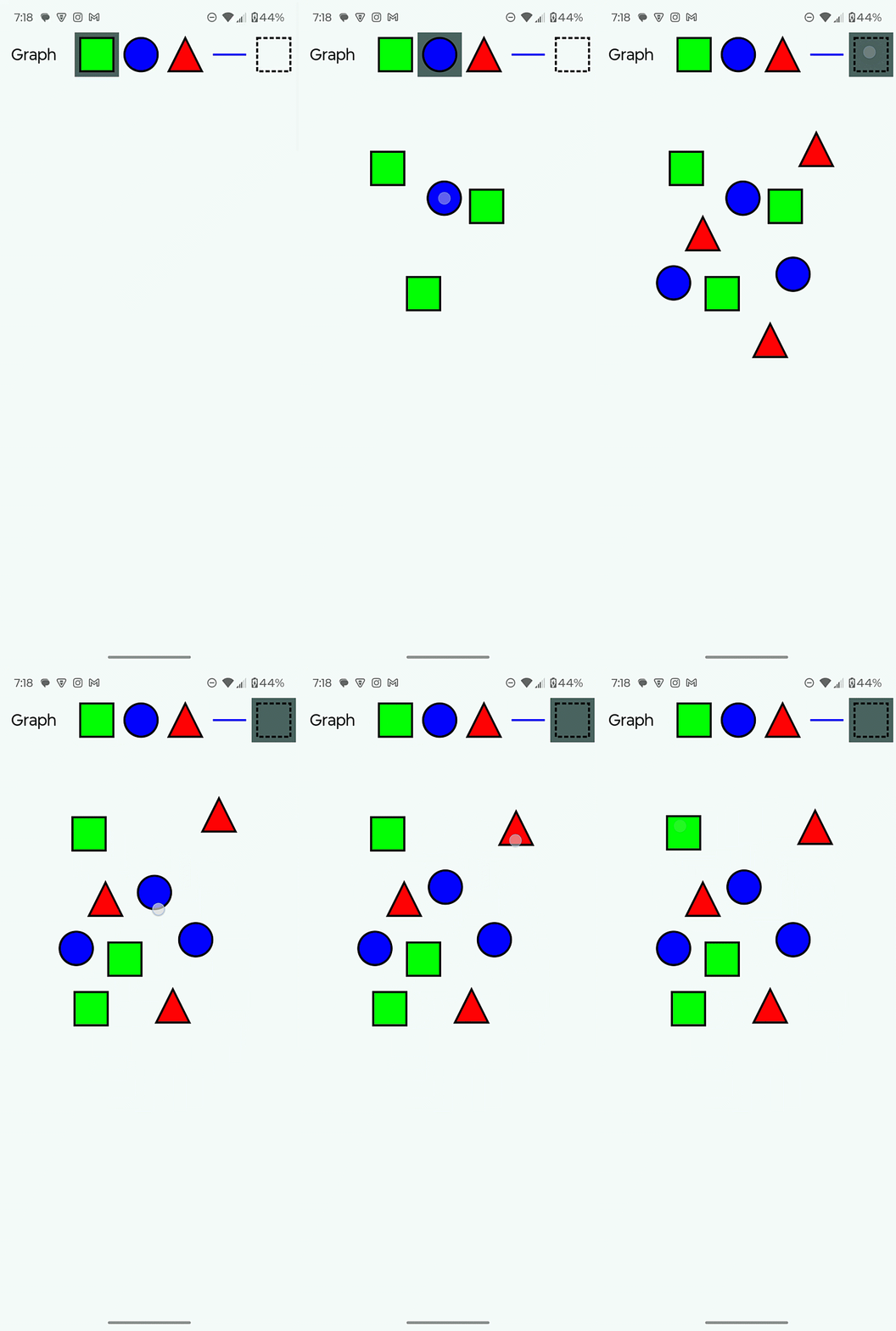
We can now drag shapes! Note that the dragged shape stays on top of all others, and the shape stays relative to where the user initially pressed.
All code changes
CHANGED: app/src/main/java/com/androidbyexample/graph/Graph.kt
package com.androidbyexample.graph

import androidx.compose.foundation.Canvas
import androidx.compose.foundation.gestures.detectDragGestures
import androidx.compose.foundation.gestures.detectTapGestures
import androidx.compose.foundation.layout.fillMaxSize
import androidx.compose.foundation.layout.padding
import androidx.compose.material3.ExperimentalMaterial3Api
import androidx.compose.material3.MaterialTheme
import androidx.compose.material3.Scaffold
import androidx.compose.material3.Text
import androidx.compose.material3.TopAppBar
import androidx.compose.runtime.Composable
import androidx.compose.runtime.getValue
import androidx.compose.runtime.remember
import androidx.compose.runtime.rememberUpdatedState
import androidx.compose.ui.Modifier
import androidx.compose.ui.geometry.Offset
import androidx.compose.ui.geometry.Size
import androidx.compose.ui.graphics.Color
import androidx.compose.ui.graphics.Path
import androidx.compose.ui.graphics.PathEffect
import androidx.compose.ui.graphics.drawscope.DrawScope
import androidx.compose.ui.graphics.drawscope.Fill
import androidx.compose.ui.graphics.drawscope.Stroke
import androidx.compose.ui.graphics.drawscope.translate
import androidx.compose.ui.input.pointer.pointerInput
import androidx.compose.ui.platform.LocalDensity
import androidx.compose.ui.res.stringResource
import androidx.compose.ui.unit.Dp
import androidx.compose.ui.unit.dp

@OptIn(ExperimentalMaterial3Api::class)
@Composable
fun Graph(
    shapes: List<Shape>,
    onAddShape: (Shape) -> Unit,
    selectedTool: ToolType,
    onSelectedToolChanged: (ToolType) -> Unit,
    onPress: (Offset, Float) -> Unit,
    onDrag: (Offset) -> Unit,
    onDragEnd: () -> Unit,
    modifier: Modifier = Modifier,
    shapeSizeDp: Dp = 48.dp,
    shapeOutlineWidthDp: Dp = 3.dp,
    dashWidthDp: Dp = 6.dp,
    dashGapDp: Dp = 3.dp,
    shapeOutlineColor: Color = Color.Black,
    triangleColor: Color = Color.Red,
    circleColor: Color = Color.Blue,
    squareColor: Color = Color.Green,
    selectedToolColor: Color = MaterialTheme.colorScheme.secondary,
) {
    with(LocalDensity.current) {
        val shapeSizePx = shapeSizeDp.toPx()
        val halfShapeSizePx = shapeSizePx/2
        val shapeOutlineWidthPx = shapeOutlineWidthDp.toPx()
        val shapeSize = Size(shapeSizePx, shapeSizePx)
        val halfShapeOffset = Offset(halfShapeSizePx, halfShapeSizePx)
        val dashWidthPx = dashWidthDp.toPx()
        val dashGapPx = dashGapDp.toPx()

        val trianglePath = Path().apply {
            moveTo(shapeSizePx/2, 0f)
            lineTo(shapeSizePx, shapeSizePx)
            lineTo(0f, shapeSizePx)
            close()
        }

        val shapeOutlineStroke = remember(shapeOutlineWidthPx) {
            Stroke(shapeOutlineWidthPx)
        }
        val dashedOutlineStroke =
            remember(shapeOutlineWidthPx, dashWidthPx, dashGapPx) {
                Stroke(
                    width = shapeOutlineWidthPx,
                    pathEffect = PathEffect.dashPathEffect(
                        intervals = floatArrayOf(dashWidthPx, dashGapPx),
                        phase = 0f,
                    )
                )
            }

        fun DrawScope.drawTriangle(
            offset: Offset,
        ) {
            translate(offset.x, offset.y) {
                drawPath(
                    path = trianglePath,
                    color = triangleColor,
                    style = Fill,
                )
                drawPath(
                    path = trianglePath,
                    color = shapeOutlineColor,
                    style = shapeOutlineStroke,
                )
            }
        }
        fun DrawScope.drawSquare(
            offset: Offset,
            outlineStroke: Stroke = shapeOutlineStroke,
            fill: Boolean = true,
        ) {
            translate(offset.x, offset.y) {
                if (fill) {
                    drawRect(
                        topLeft = Offset.Zero,
                        size = shapeSize,
                        color = squareColor,
                        style = Fill,
                    )
                }
                drawRect(
                    topLeft = Offset.Zero,
                    size = shapeSize,
                    color = shapeOutlineColor,
                    style = outlineStroke,
                )
            }
        }
        fun DrawScope.drawCircle(
            offset: Offset,
        ) {
            translate(offset.x, offset.y) {
                drawCircle(
                    center = halfShapeOffset,
                    radius = halfShapeSizePx,
                    color = circleColor,
                    style = Fill,
                )
                drawCircle(
                    center = halfShapeOffset,
                    radius = halfShapeSizePx,
                    color = shapeOutlineColor,
                    style = shapeOutlineStroke,
                )
            }
        }
        fun DrawScope.drawLine(
            offset: Offset,
        ) {
            translate(offset.x, offset.y) {
                drawLine(
                    start = Offset(0f, halfShapeSizePx),
                    end = Offset(shapeSizePx, halfShapeSizePx),
                    color = circleColor,
                    strokeWidth = shapeOutlineWidthPx,
                )
            }
        }

        val selectedToolRef by rememberUpdatedState(selectedTool)
        val onAddShapeRef by rememberUpdatedState(onAddShape)
        val halfShapeOffsetRef by rememberUpdatedState(halfShapeOffset)
        val shapeSizePxRef by rememberUpdatedState(shapeSizePx)
        val onPressRef by rememberUpdatedState(onPress)
        val onDragRef by rememberUpdatedState(onDrag)
        val onDragEndRef by rememberUpdatedState(onDragEnd)

        Scaffold(
            topBar = {
                TopAppBar(
                    title = { Text(stringResource(R.string.graph)) },
                    actions = {
                        ToolButton(
                            draw = { drawSquare(it) },
                            shapeSizeDp = shapeSizeDp,
                            tool = Square,
                            selectedTool = selectedTool,
                            selectionColor = selectedToolColor,
                            onSelectTool = onSelectedToolChanged,
                        )
                        ToolButton(
                            draw = { drawCircle(it) },
                            shapeSizeDp = shapeSizeDp,
                            tool = Circle,
                            selectedTool = selectedTool,
                            selectionColor = selectedToolColor,
                            onSelectTool = onSelectedToolChanged,
                        )
                        ToolButton(
                            draw = { drawTriangle(it) },
                            shapeSizeDp = shapeSizeDp,
                            tool = Triangle,
                            selectedTool = selectedTool,
                            selectionColor = selectedToolColor,
                            onSelectTool = onSelectedToolChanged,
                        )
                        ToolButton(
                            draw = { drawLine(it) },
                            shapeSizeDp = shapeSizeDp,
                            tool = DrawLine,
                            selectedTool = selectedTool,
                            selectionColor = selectedToolColor,
                            onSelectTool = onSelectedToolChanged,
                        )
                        ToolButton(
                            draw = {
                                drawSquare(
                                    offset = it,
                                    outlineStroke = dashedOutlineStroke,
                                    fill = false,
                                )
                            },
                            shapeSizeDp = shapeSizeDp,
                            tool = Select,
                            selectedTool = selectedTool,
                            selectionColor = selectedToolColor,
                            onSelectTool = onSelectedToolChanged,
                        )
                    }
                )
            },
            modifier = modifier,
        ) { innerPadding ->
            val baseModifier =
                modifier
                    .padding(innerPadding)
                    .fillMaxSize()

            val canvasModifier =
                when(selectedTool) {
                    is ShapeType ->
                        baseModifier
                            .pointerInput(true) {
                                detectTapGestures { finger ->
                                    onAddShapeRef(
                                        Shape(
                                            shapeType = selectedToolRef as ShapeType,
                                            offset = finger - halfShapeOffsetRef
                                        )
                                    )
                                }
                            }

                    DrawLine ->
                        baseModifier
                            .pointerInput(true) { TODO("tap handler") }
                            .pointerInput(true) { TODO("drag handler") }
                    Select ->
                        baseModifier
//                          .pointerInput(true) { TODO("tap handler") }
//                          .pointerInput(true) { TODO("drag handler") }
                            .pointerInput(true) {
                                detectTapGestures(
                                    onPress = { onPressRef(it, shapeSizePxRef) }
                                )
                            }
                            .pointerInput(true) {
                                detectDragGestures(
                                    onDragStart = onDragRef,
                                    onDrag = { change, _ ->
                                        onDragRef(change.position)
                                    },
                                    onDragCancel = onDragEndRef,
                                    onDragEnd = onDragEndRef,
                                )
                            }
                }

            Canvas(modifier = canvasModifier) {
                shapes.forEach { shape ->
                    when(shape.shapeType) {
                        Square -> drawSquare(shape.offset)
                        Circle -> drawCircle(shape.offset)
                        Triangle -> drawTriangle(shape.offset)
                    }
                }
            }
        }
    }
}
CHANGED: app/src/main/java/com/androidbyexample/graph/GraphViewModel.kt
package com.androidbyexample.graph

import androidx.compose.ui.geometry.Offset
import androidx.lifecycle.ViewModel
import kotlinx.coroutines.flow.Flow
import kotlinx.coroutines.flow.MutableStateFlow

class GraphViewModel: ViewModel() {
    val shapes: Flow<List<Shape>>
        field = MutableStateFlow<List<Shape>>(emptyList())
    val selectedTool: Flow<ToolType>
        field = MutableStateFlow<ToolType>(Square)

    fun addShape(shape: Shape) {
        shapes.value += shape
    }
    fun selectTool(tool: ToolType) {
        selectedTool.value = tool
    }

    // handle shape drags
    private var selectedShape: Shape? = null
    private var dragShapeOffset = Offset.Zero

    fun press(finger: Offset, shapeSizePx: Float) {
        selectedShape = shapes.value.findAt(finger, shapeSizePx)?.apply {
            dragShapeOffset = finger - offset
        }
    }

    fun drag(finger: Offset) {
        selectedShape?.let { shape ->
            val newShape = shape.copy(offset = finger - dragShapeOffset).apply {
                selectedShape = this
            }
            shapes.value = shapes.value - shape + newShape
        }
    }
    fun endDrag() {
        selectedShape = null
        dragShapeOffset = Offset.Zero
    }

    fun List<Shape>.findAt(offset: Offset, shapeSizePx: Float) =
        asReversed().find { shape ->
            val normalized = offset - shape.offset
            normalized.x in 0f..shapeSizePx &&
            normalized.y in 0f..shapeSizePx
        }
}
CHANGED: app/src/main/java/com/androidbyexample/graph/MainActivity.kt
package com.androidbyexample.graph

import android.os.Bundle
import androidx.activity.ComponentActivity
import androidx.activity.compose.setContent
import androidx.activity.enableEdgeToEdge
import androidx.activity.viewModels
import androidx.compose.runtime.getValue
import androidx.lifecycle.compose.collectAsStateWithLifecycle
import com.androidbyexample.graph.ui.theme.GraphTheme

class MainActivity : ComponentActivity() {
    private val viewModel by viewModels<GraphViewModel>()

    override fun onCreate(savedInstanceState: Bundle?) {
        super.onCreate(savedInstanceState)
        enableEdgeToEdge()
        setContent {
            val shapes by viewModel.shapes.collectAsStateWithLifecycle(emptyList())
            val selectedTool by viewModel.selectedTool.collectAsStateWithLifecycle(Square)

            GraphTheme {
                Graph(
                    shapes = shapes,
                    selectedTool = selectedTool,
                    onSelectedToolChanged = viewModel::selectTool,
                    onAddShape = viewModel::addShape,
                    onPress = viewModel::press,
                    onDrag = viewModel::drag,
                    onDragEnd = viewModel::endDrag,
                )
            }
        }
    }
}