Graph Editor part 1
Dropping shapes
When the user has a selected shape on the toolbar, if they tap on the canvas, we'll drop a new shape.
To do this, we need to listen to the canvas for clicks. The clickable modifier doesn't tell us
where the user clicks, just that they clicked. We'll use the pointerInput modifier instead:
show in full file app/src/main/java/com/androidbyexample/graph/Graph.kt
// ...

@OptIn(ExperimentalMaterial3Api::class)
@Composable
fun Graph(
    // ...
) {
    with(LocalDensity.current) {
        // ...
        Scaffold(
            // ...
        ) { innerPadding ->
            Canvas(modifier = modifier
                .padding(innerPadding)
                // ...
                .fillMaxSize()
                .pointerInput(true) {
                    detectTapGestures { finger ->
                        when(selectedTool) {
                            is ShapeType -> {
                                onAddShape(Shape(selectedTool, finger))
                            }
                            Line -> TODO()
                            Select -> TODO()
                        }
                    }
                }
            ) {
                shapes.forEach { shape ->
                    // ...
            }
        }
    }
}
Passing true as the key to pointerInput never allows it to be re-initialized. We'll be defining
some gesture detectors inside the pointerInput, which we don't want to get redefined mid-gesture.
If they were, we would lose the current state of a drag, for example.
This requires a new parameter
show in full file app/src/main/java/com/androidbyexample/graph/Graph.kt
// ...

@OptIn(ExperimentalMaterial3Api::class)
@Composable
fun Graph(
    shapes: List<Shape>,
    onAddShape: (Shape) -> Unit,
    selectedTool: ToolType,
    onSelectedToolChanged: (ToolType) -> Unit,
    // ...
) {
    // ...
}
And connecting it to the view model
show in full file app/src/main/java/com/androidbyexample/graph/MainActivity.kt
// ...
class MainActivity : ComponentActivity() {
    // ...
    override fun onCreate(savedInstanceState: Bundle?) {
        // ...
        setContent {
            // ...
            GraphTheme {
                Graph(
                    // ...
                    selectedTool = selectedTool,
                    onSelectedToolChanged = viewModel::selectTool,
                    onAddShape = viewModel::addShape,
                )
            }
        }
    }
}
Finally, let's draw the shapes:
show in full file app/src/main/java/com/androidbyexample/graph/Graph.kt
// ...

@OptIn(ExperimentalMaterial3Api::class)
@Composable
fun Graph(
    // ...
) {
    with(LocalDensity.current) {
        // ...
        Scaffold(
            // ...
        ) { innerPadding ->
            Canvas(modifier = modifier
                // ...
                }
            ) {
                shapes.forEach { shape ->
                    when(shape.shapeType) {
                        Square -> drawSquare(shape.offset)
                        Circle -> drawCircle(shape.offset)
                        Triangle -> drawTriangle(shape.offset)
                    }
                }
            }
        }
    }
}
When we tap on the Canvas, squares are added. But if we click on the circle on the toolbar, and
tap the Canvas, it still drops squares!
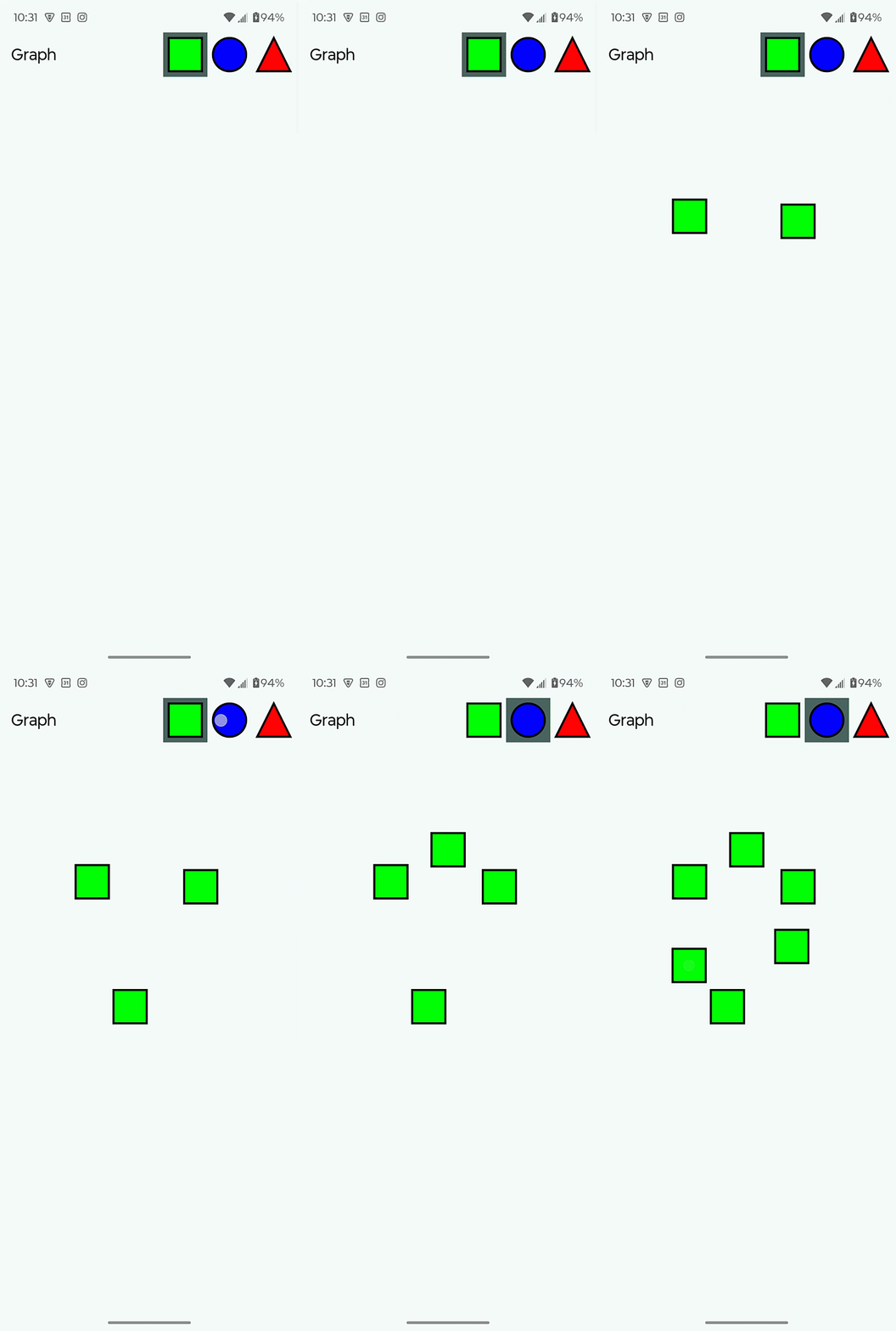
What's happening?
The problem is the way the detector lambda is being defined and the surrounding context that it
captures. Keep in mind that the Graph function gets called repeatedly as parameters change.
One of those parameter changes is the selectedTool.
When Graph is first called, selectedTool is Square. The lambda for detectTapGestures
captures its surrounding context, including the selectedTool property. Lambdas in Kotlin are
true closures, so if that property changes in that captured context, the new value will be
seen.
The gesture detector is stored in the Compose user-interface tree, and never recreated because
the same value (true) is passed to pointerInput every time it is called.
The problem is that every time Graph is called with the new value of selectedTool,
it creates a new context that would be captured by the detectTapGestures lambda, containing
that updated tool selection. This new context isn't seen by the lambda we stored.
If we added selectedTool as the key for pointerInput (instead of true), it would work as
we expect. However, this could allow recomposition to happen in the middle of a tap (which is a
combination of a press and release) or drag, which would cancel the gesture and kill the detector.
We need to find another way to see changes to the value of selectedTool.
All code changes
CHANGED: app/src/main/java/com/androidbyexample/graph/Graph.kt
package com.androidbyexample.graph

import androidx.compose.foundation.Canvas
import androidx.compose.foundation.gestures.detectTapGestures
import androidx.compose.foundation.layout.fillMaxSize
import androidx.compose.foundation.layout.padding
import androidx.compose.material3.ExperimentalMaterial3Api
import androidx.compose.material3.MaterialTheme
import androidx.compose.material3.Scaffold
import androidx.compose.material3.Text
import androidx.compose.material3.TopAppBar
import androidx.compose.runtime.Composable
import androidx.compose.runtime.remember
import androidx.compose.ui.Modifier
import androidx.compose.ui.geometry.Offset
import androidx.compose.ui.geometry.Size
import androidx.compose.ui.graphics.Color
import androidx.compose.ui.graphics.Path
import androidx.compose.ui.graphics.drawscope.DrawScope
import androidx.compose.ui.graphics.drawscope.Fill
import androidx.compose.ui.graphics.drawscope.Stroke
import androidx.compose.ui.graphics.drawscope.translate
import androidx.compose.ui.input.pointer.pointerInput
import androidx.compose.ui.platform.LocalDensity
import androidx.compose.ui.res.stringResource
import androidx.compose.ui.unit.Dp
import androidx.compose.ui.unit.dp

@OptIn(ExperimentalMaterial3Api::class)
@Composable
fun Graph(
    shapes: List<Shape>,
    onAddShape: (Shape) -> Unit,
    selectedTool: ToolType,
    onSelectedToolChanged: (ToolType) -> Unit,
    modifier: Modifier = Modifier,
    shapeSizeDp: Dp = 48.dp,
    shapeOutlineWidthDp: Dp = 3.dp,
    shapeOutlineColor: Color = Color.Black,
    triangleColor: Color = Color.Red,
    circleColor: Color = Color.Blue,
    squareColor: Color = Color.Green,
    selectedToolColor: Color = MaterialTheme.colorScheme.secondary,
) {
    with(LocalDensity.current) {
        val shapeSizePx = shapeSizeDp.toPx()
        val halfShapeSizePx = shapeSizePx/2
        val shapeOutlineWidthPx = shapeOutlineWidthDp.toPx()
        val shapeSize = Size(shapeSizePx, shapeSizePx)
        val halfShapeOffset = Offset(halfShapeSizePx, halfShapeSizePx)

        val trianglePath = Path().apply {
            moveTo(shapeSizePx/2, 0f)
            lineTo(shapeSizePx, shapeSizePx)
            lineTo(0f, shapeSizePx)
            close()
        }

        val shapeOutlineStroke = remember(shapeOutlineWidthPx) {
            Stroke(shapeOutlineWidthPx)
        }

        fun DrawScope.drawTriangle(
            offset: Offset,
        ) {
            translate(offset.x, offset.y) {
                drawPath(
                    path = trianglePath,
                    color = triangleColor,
                    style = Fill,
                )
                drawPath(
                    path = trianglePath,
                    color = shapeOutlineColor,
                    style = shapeOutlineStroke,
                )
            }
        }
        fun DrawScope.drawSquare(
            offset: Offset,
        ) {
            translate(offset.x, offset.y) {
                drawRect(
                    topLeft = Offset.Zero,
                    size = shapeSize,
                    color = squareColor,
                    style = Fill,
                )
                drawRect(
                    topLeft = Offset.Zero,
                    size = shapeSize,
                    color = shapeOutlineColor,
                    style = shapeOutlineStroke,
                )
            }
        }
        fun DrawScope.drawCircle(
            offset: Offset,
        ) {
            translate(offset.x, offset.y) {
                drawCircle(
                    center = halfShapeOffset,
                    radius = halfShapeSizePx,
                    color = circleColor,
                    style = Fill,
                )
                drawCircle(
                    center = halfShapeOffset,
                    radius = halfShapeSizePx,
                    color = shapeOutlineColor,
                    style = shapeOutlineStroke,
                )
            }
        }

        Scaffold(
            topBar = {
                TopAppBar(
                    title = { Text(stringResource(R.string.graph)) },
                    actions = {
                        ToolButton(
                            draw = { drawSquare(it) },
                            shapeSizeDp = shapeSizeDp,
                            tool = Square,
                            selectedTool = selectedTool,
                            selectionColor = selectedToolColor,
                            onSelectTool = onSelectedToolChanged,
                        )
                        ToolButton(
                            draw = { drawCircle(it) },
                            shapeSizeDp = shapeSizeDp,
                            tool = Circle,
                            selectedTool = selectedTool,
                            selectionColor = selectedToolColor,
                            onSelectTool = onSelectedToolChanged,
                        )
                        ToolButton(
                            draw = { drawTriangle(it) },
                            shapeSizeDp = shapeSizeDp,
                            tool = Triangle,
                            selectedTool = selectedTool,
                            selectionColor = selectedToolColor,
                            onSelectTool = onSelectedToolChanged,
                        )
                    }
                )
            },
            modifier = modifier,
        ) { innerPadding ->
            Canvas(modifier = modifier
                .padding(innerPadding)
//              .fillMaxSize()) {
//              drawTriangle(Offset(100f, 100f))
//              drawCircle(Offset(150f, 150f))
//              drawSquare(Offset(200f, 200f))
                .fillMaxSize()
                .pointerInput(true) {
                    detectTapGestures { finger ->
                        when(selectedTool) {
                            is ShapeType -> {
                                onAddShape(Shape(selectedTool, finger))
                            }
                            Line -> TODO()
                            Select -> TODO()
                        }
                    }
                }
            ) {
                shapes.forEach { shape ->
                    when(shape.shapeType) {
                        Square -> drawSquare(shape.offset)
                        Circle -> drawCircle(shape.offset)
                        Triangle -> drawTriangle(shape.offset)
                    }
                }
            }
        }
    }
}
CHANGED: app/src/main/java/com/androidbyexample/graph/MainActivity.kt
package com.androidbyexample.graph

import android.os.Bundle
import androidx.activity.ComponentActivity
import androidx.activity.compose.setContent
import androidx.activity.enableEdgeToEdge
import androidx.activity.viewModels
import androidx.compose.runtime.getValue
import androidx.lifecycle.compose.collectAsStateWithLifecycle
import com.androidbyexample.graph.ui.theme.GraphTheme

class MainActivity : ComponentActivity() {
    private val viewModel by viewModels<GraphViewModel>()

    override fun onCreate(savedInstanceState: Bundle?) {
        super.onCreate(savedInstanceState)
        enableEdgeToEdge()
        setContent {
            val shapes by viewModel.shapes.collectAsStateWithLifecycle(emptyList())
            val selectedTool by viewModel.selectedTool.collectAsStateWithLifecycle(Square)

            GraphTheme {
                Graph(
                    shapes = shapes,
                    selectedTool = selectedTool,
                    onSelectedToolChanged = viewModel::selectTool,
                    onAddShape = viewModel::addShape,
                )
            }
        }
    }
}