Google Map
Navigating
The Google Map SDK for Android's terms of use forbids using Google's navigation data for real-time navigation in your own application. If you want to show the user how to get from point A to B in real time, you need to launch the Google Maps application itself.
We launch navigation using an Android Intent. An Intent describes something you would like to
do, typically with a different application or system service. This intent contains a URI that
represents the navigation request:
show in full file app/src/main/java/com/androidbyexample/google/maps/MainActivity.kt
// ...
class MainActivity : ComponentActivity() {
    // ...
    override fun onCreate(savedInstanceState: Bundle?) {
        // ...
        setContent {
            // ...
            var animateToCurrentLocation by remember { mutableStateOf(false) }

            val context = LocalContext.current

            GooglemapsTheme {
                Scaffold(
                    topBar = {
                        CarTopBar(
                            // ...
                            },
                            onClearCarLocation = viewModel::clearCarLocation,
//                          onWalkToCar = {},
                            onWalkToCar = {
                                currentLocation?.let { curr ->
                                    carLatLng?.let { car ->
                                        val uri =
                                            ("https://www.google.com/maps/dir/" +
                                                    "?api=1&origin=${curr.latitude}," +
                                                    "${curr.longitude}&" +
                                                    "destination=${car.latitude}," +
                                                    "${car.longitude}&travelmode=walking").toUri()
                                        context.startActivity(
                                            Intent(
                                                Intent.ACTION_VIEW,
                                                uri
                                            ).apply {
                                                setPackage("com.google.android.apps.maps")
                                            })
                                    } ?: Toast.makeText(
                                        context,
                                        "Cannot navigate; no car location available",
                                        Toast.LENGTH_LONG
                                    ).show()
                                } ?: Toast.makeText(
                                    context,
                                    "Cannot navigate; no current location available",
                                    Toast.LENGTH_LONG
                                ).show()
                            },
                        )
                    },
                    // ...
                ) { innerPadding ->
                    // ...
                }
            }
        }
    }
    // ...
}
https://www.google.com/maps/dir/?api=1&origin=${curr.latitude},${curr.longitude}&destination=${car.latitude},${car.longitude}&travelmode=walking
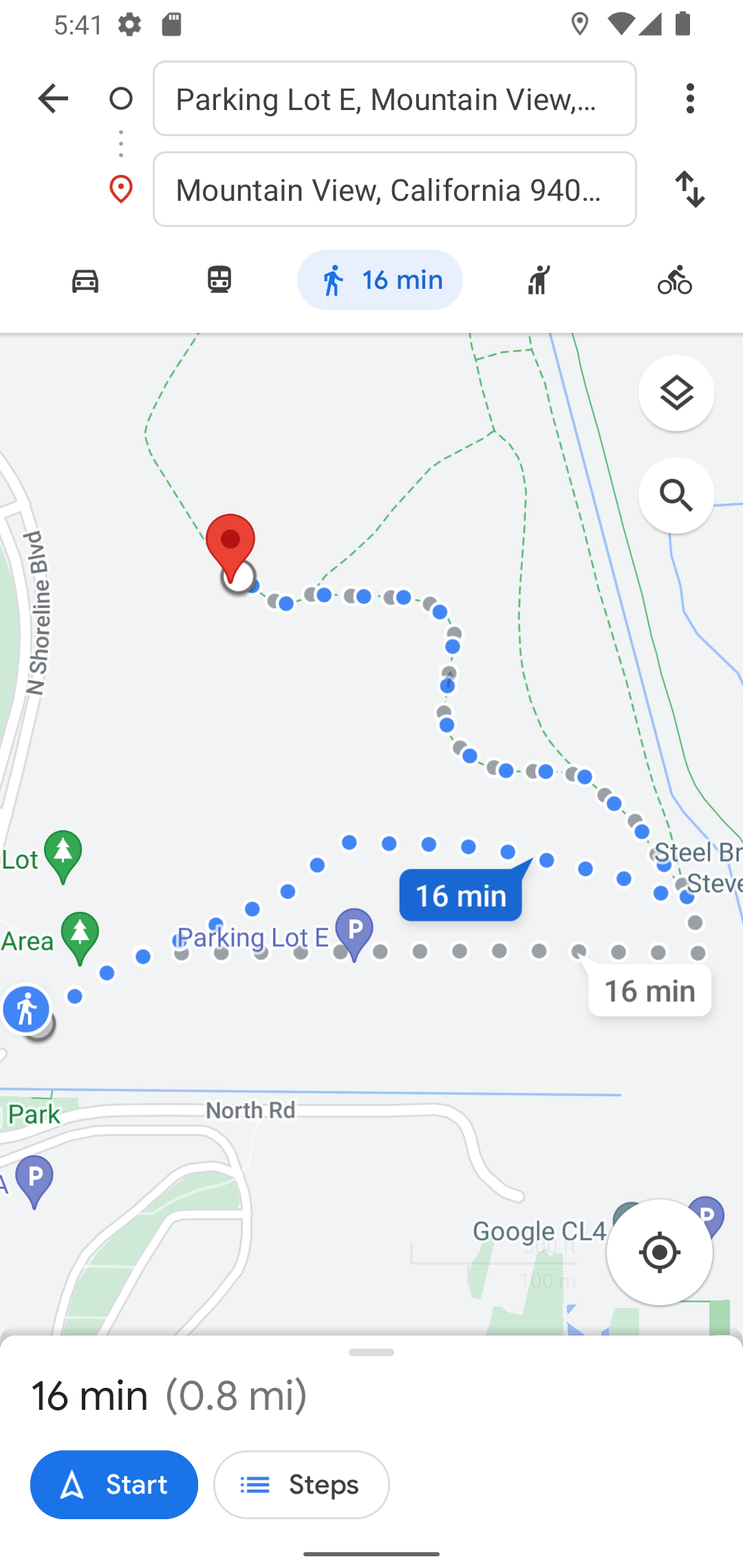
The Google Maps application registers IntentFilters that watch for URIs starting with
"https://www.google.com/maps". The Android platform directs this Intent to Google Maps, and it
presents navigation options:
All code changes
CHANGED: app/src/main/java/com/androidbyexample/google/maps/MainActivity.kt
package com.androidbyexample.google.maps
import android.Manifest
import android.annotation.SuppressLint
import android.content.Intent
import android.content.pm.PackageManager
import android.location.Location
import android.os.Bundle
import android.os.Looper
import android.provider.Settings
import android.widget.Toast
import androidx.activity.ComponentActivity
import androidx.activity.compose.setContent
import androidx.activity.enableEdgeToEdge
import androidx.activity.result.contract.ActivityResultContracts
import androidx.activity.viewModels
import androidx.compose.animation.AnimatedVisibility
import androidx.compose.animation.EnterTransition
import androidx.compose.animation.fadeOut
import androidx.compose.foundation.background
import androidx.compose.foundation.layout.fillMaxSize
import androidx.compose.foundation.layout.padding
import androidx.compose.foundation.layout.wrapContentSize
import androidx.compose.material3.CircularProgressIndicator
import androidx.compose.material3.MaterialTheme
import androidx.compose.material3.Scaffold
import androidx.compose.runtime.Composable
import androidx.compose.runtime.getValue
import androidx.compose.runtime.mutableStateOf
import androidx.compose.runtime.remember
import androidx.compose.runtime.setValue
import androidx.compose.ui.Modifier
import androidx.compose.ui.platform.LocalContext
import androidx.core.app.ActivityCompat
import androidx.core.net.toUri
import androidx.lifecycle.compose.collectAsStateWithLifecycle
import com.androidbyexample.google.maps.ui.theme.GooglemapsTheme
import com.google.android.gms.common.GoogleApiAvailability
import com.google.android.gms.location.FusedLocationProviderClient
import com.google.android.gms.location.LocationCallback
import com.google.android.gms.location.LocationRequest
import com.google.android.gms.location.LocationResult
import com.google.android.gms.location.LocationServices
import com.google.android.gms.location.Priority
import com.google.android.gms.maps.model.CameraPosition
import com.google.android.gms.maps.model.LatLng
import com.google.maps.android.compose.rememberCameraPositionState
class MainActivity : ComponentActivity() {
private val viewModel: CarViewModel by viewModels()
private lateinit var fusedLocationProviderClient: FusedLocationProviderClient
private val locationCallback = object : LocationCallback() {
override fun onLocationResult(locationResult: LocationResult) {
viewModel.updateLocation(locationResult.lastLocation)
}
}
private val locationPermissions = arrayOf(
Manifest.permission.ACCESS_FINE_LOCATION,
Manifest.permission.ACCESS_COARSE_LOCATION,
)
private val quitOption = DialogOption(R.string.quit) { finish() }
private val getLocationPermission =
registerForActivityResult(
ActivityResultContracts.RequestMultiplePermissions()
) { isGranted ->
viewModel.updateAppState(
when {
isGranted.values.any { it } -> PermissionsGranted
else -> RequestPermission // ask again
}
)
}
// helper to make the checks more readable in onCreate
private fun locationPermissionsGranted() =
locationPermissions.any { permission ->
ActivityCompat.checkSelfPermission(this, permission) ==
PackageManager.PERMISSION_GRANTED
}
override fun onCreate(savedInstanceState: Bundle?) {
super.onCreate(savedInstanceState)
checkPlayServices()
enableEdgeToEdge()
setContent {
val appState by viewModel.appState.collectAsStateWithLifecycle(Startup)
val currentLocation by viewModel.currentLocation.collectAsStateWithLifecycle(
initialValue = null
)
val carLatLng by viewModel.carLatLng.collectAsStateWithLifecycle(
initialValue = null
)
var animateToCurrentLocation by remember { mutableStateOf(false) }
val context = LocalContext.current
GooglemapsTheme {
Scaffold(
topBar = {
CarTopBar(
currentLocation = currentLocation,
carLatLng = carLatLng,
onSetCarLocation = viewModel::setCarLocation,
onGoToCurrentLocation = {
animateToCurrentLocation = true
},
onClearCarLocation = viewModel::clearCarLocation,
)
},
modifier = Modifier.fillMaxSize()
) { innerPadding ->
val modifier = Modifier.padding(innerPadding)
when (appState) {
Startup -> Loading(modifier)
PlayServicesOk -> {
viewModel.updateAppState(
when {
locationPermissionsGranted() -> PermissionsGranted
else -> RequestPermission
}
)
}
PermissionsGranted -> {
startLocation()
viewModel.updateAppState(ShowMap)
}
ShowMap ->
ShowMap(
carLatLng = carLatLng,
animateToCurrentLocation = animateToCurrentLocation,
onAnimatedToCurrentLocation = {
animateToCurrentLocation = false
},
onMoveCar = viewModel::setCarLocation,
modifier = modifier,
currentLocation = currentLocation,
)
RequestPermission -> ExplainPermission()
PlayServicesRequired -> PlayServicesRequired()
}
}
}
}
}
private fun checkPlayServices() {
GoogleApiAvailability.getInstance()
.makeGooglePlayServicesAvailable(this)
.addOnSuccessListener {
viewModel.updateAppState(PlayServicesOk)
}.addOnFailureListener(this) {
viewModel.updateAppState(PlayServicesRequired)
}
}
@Composable
fun ExplainPermission() {
ThreeButtonDialog(
titleId = R.string.permissions_needed,
text =
// Note - I'm including the text as a literal so it's easier to understand
// the example on the web page. Text like this should always be defined
// in strings.xml
"This application requires location permissions to save and locate " +
"the position of your car. Please grant " +
"'Precise Location' permission.\n\n" +
"Press Ok for permission request.\n\n" +
"If Ok does nothing, this means you " +
"have previously permanently denied the request. In this case, press " +
"'App Info' to change the permissions and restart the app.",
DialogOption(R.string.app_info) {
startActivity(
Intent(Settings.ACTION_APPLICATION_DETAILS_SETTINGS).apply {
data = "package:$packageName".toUri()
}
)
finish()
},
DialogOption(R.string.quit) { finish() },
DialogOption(R.string.ok) {
getLocationPermission.launch(locationPermissions)
}
)
}
@Composable
fun PlayServicesRequired() {
ThreeButtonDialog(
titleId = R.string.play_services_required,
text =
// Note - I'm including the text as a literal so it's easier to understand
// the example on the web page. Text like this should always be defined
// in strings.xml
"Google Play services required (or upgrade required)",
quitOption,
)
}
@SuppressLint("MissingPermission")
fun startLocation() {
val locationRequest =
LocationRequest.Builder(Priority.PRIORITY_HIGH_ACCURACY, 5000)
.setWaitForAccurateLocation(false)
.setMinUpdateIntervalMillis(0)
.setMaxUpdateDelayMillis(5000)
.build()
fusedLocationProviderClient =
LocationServices.getFusedLocationProviderClient(this)
fusedLocationProviderClient.requestLocationUpdates(
locationRequest,
locationCallback,
Looper.getMainLooper()
)
}
@Composable
fun ShowMap(
carLatLng: LatLng?,
animateToCurrentLocation: Boolean,
onAnimatedToCurrentLocation: () -> Unit,
onMoveCar: (LatLng) -> Unit,
modifier: Modifier,
currentLocation: Location?,
) {
val googleHQ = LatLng(37.42423291057923, -122.08811454627153)
val defaultCameraPosition = CameraPosition.fromLatLngZoom(googleHQ, 11f)
val cameraPositionState = rememberCameraPositionState {
position = defaultCameraPosition
}
GoogleMapDisplay(
carLatLng = carLatLng,
currentLocation = currentLocation,
cameraPositionState = cameraPositionState,
animateToCurrentLocation = animateToCurrentLocation,
onAnimatedToCurrentLocation = onAnimatedToCurrentLocation,
onMoveCar = onMoveCar,
modifier = modifier.fillMaxSize(),
)
}
@Composable
fun Loading(
modifier: Modifier,
) {
AnimatedVisibility(
visible = true,
modifier = modifier.fillMaxSize(),
enter = EnterTransition.None,
exit = fadeOut()
) {
CircularProgressIndicator(
modifier = Modifier
.background(MaterialTheme.colorScheme.background)
.wrapContentSize()
)
}
}
}