Initial Movies UI
Create data
Now we create some fake data to display Movies in the app. After we talk about databases, we'll convert the data into something real (and add Actors and Ratings).
First, let's create a "data" package to hold our code. Expand app/src/main/java, and you'll see the initially-created package "com.androidbyexample.movies". Right-click on it and choose New > Package.
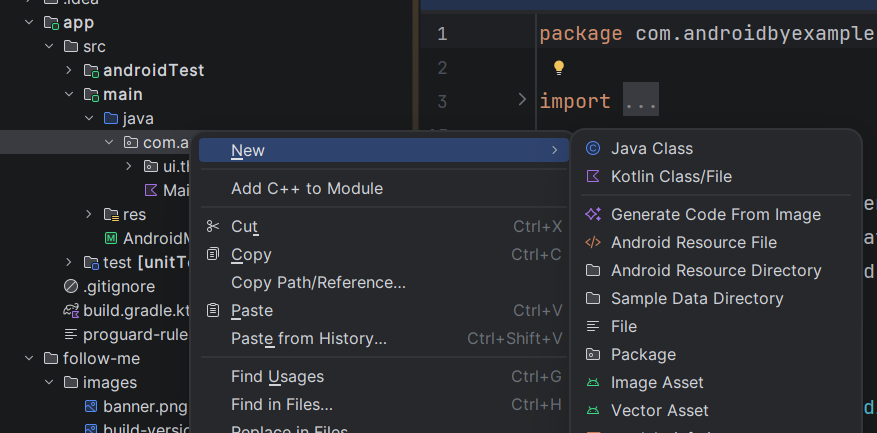
Add ".data" on the end of the package name to create a new "sub-package".
Note
A "sub-package" just happens to share a string prefix with another package; there's no relation between the packages from a Kotlin (or Java) standpoint.
Now right-click on that "data" package and choose New > Kotlin Class/File.

Enter "Movie" and choose "File"
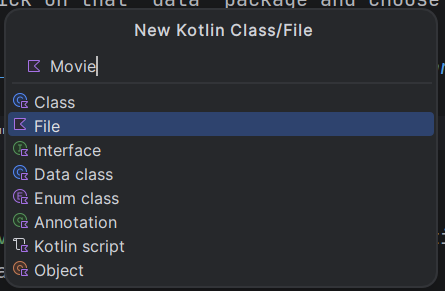
For now, we'll just hold a title and description, but we'll add more when we create our database.
Note
We need to make the movie class Parcelable.
Parcelable is a fast Android means of converting an object into binary data that can be
stored and retrieved.
We need to be able to hibernate an application when the user navigates away from it
(to the home screen or another application) and then comes back, so we come back to where the
user was working.
We add the Kotlin Parcelize plugin to our build, which will generate code
to make our Movie Parcelable. The kotlin-parcelize plugin is added automatically to the build
classpath by the Android Gradle Plugin (AGP), so we just need to reference its id in the plugins
section of our app's build file to activate it.
Note
Depending on how you use the navigation library, you may need to make your data Serializable
as well as (or instead of) Parcelable.
show in full file app/build.gradle.kts
plugins {
    alias(libs.plugins.android.application)
    alias(libs.plugins.kotlin.compose)
    id("kotlin-parcelize")
}

// ...
Now, we define the Movie:
show in full file app/src/main/java/com/androidbyexample/movies/data/Movie.kt
// ...
import kotlinx.parcelize.Parcelize

@Parcelize
data class Movie(
    val title: String,
    val description: String,
): Parcelable
Next, we'll create a MovieViewModel to hold a list of movies.
View models prepare and provide data for our user interface to consume. Here we'll hardcode
the data, but we'll change that in the database module.
This is part of our user interface, so create it directly under "com.androidbyexample.movies".
show in full file app/src/main/java/com/androidbyexample/movies/MovieViewModel.kt
// ...
import com.androidbyexample.movies.data.Movie

class MovieViewModel: ViewModel() {
    val movies: List<Movie> = listOf(
        Movie("The Transporter", "Jason Statham kicks a guy in the face"),
        Movie("Transporter 2", "Jason Statham kicks a bunch of guys in the face"),
        Movie("Hobbs and Shaw", "Cars, Explosions and Stuff"),
        Movie("Jumanji - Welcome to the Jungle", "The Rock smolders"),
    )
}
Note that you don't need to type the import statements; after you type "ViewModel", press Ctrl+Space, and it'll show it as an option and automatically import it.
Finally, we connect the view model to the MainActivity. It's under that main package.
Using the viewModels() function creates a Kotlin property delegate that will create an instance
of the specified view model (if it doesn't exist), or fetch an existing one for the
activity. This allows us to keep data across configuration changes, when the activity is
destroyed and recreated.
Note
Property delegates are crazy cool. They're an object that defines a getValue() (and
setValue(), if the property is settable). When you use the by keyword, the
property that you're defining sends any get/set requests to the delegate object after
by. In this case, the delegate created by the viewModels function checks to see if
a view model instance already exists for the activity. If so, it delegates to it. If not,
it creates and registers the view model (in case the activity is destroyed/recreated,
typically in a configuration change like device rotation between portrait/landscape
orientation).
When adding the viewModels function, it'll show in red. Place your cursor on the word
viewModels and press Alt+Enter to see your options. It'll show you an option to import
the viewModels extension function. Selecting it will add an import at the top of the file
and the error will go away.
show in full file app/src/main/java/com/androidbyexample/movies/MainActivity.kt
// ...

class MainActivity : ComponentActivity() {
    private val viewModel by viewModels<MovieViewModel>()

    override fun onCreate(savedInstanceState: Bundle?) {
        // ...
}
// ...
All code changes
CHANGED: app/build.gradle.kts
plugins {
    alias(libs.plugins.android.application)
    alias(libs.plugins.kotlin.compose)
    id("kotlin-parcelize")
}

android {
    namespace = "com.androidbyexample.movies"
    compileSdk {
        version = release(37)
    }

    defaultConfig {
        applicationId = "com.androidbyexample.movies"
        minSdk = 24
        targetSdk = 37
        versionCode = 1
        versionName = "1.0"

        testInstrumentationRunner = "androidx.test.runner.AndroidJUnitRunner"
    }

    buildTypes {
        release {
            optimization {
                enable = false
            }
        }
    }
    compileOptions {
        sourceCompatibility = JavaVersion.VERSION_11
        targetCompatibility = JavaVersion.VERSION_11
    }
    buildFeatures {
        compose = true
    }
}

dependencies {
    implementation(platform(libs.androidx.compose.bom))
    implementation(libs.androidx.activity.compose)
    implementation(libs.androidx.compose.material3)
    implementation(libs.androidx.compose.ui)
    implementation(libs.androidx.compose.ui.graphics)
    implementation(libs.androidx.compose.ui.tooling.preview)
    implementation(libs.androidx.core.ktx)
    implementation(libs.androidx.lifecycle.runtime.ktx)
    testImplementation(libs.junit)
    androidTestImplementation(platform(libs.androidx.compose.bom))
    androidTestImplementation(libs.androidx.compose.ui.test.junit4)
    androidTestImplementation(libs.androidx.espresso.core)
    androidTestImplementation(libs.androidx.junit)
    debugImplementation(libs.androidx.compose.ui.test.manifest)
    debugImplementation(libs.androidx.compose.ui.tooling)
}
CHANGED: app/src/main/java/com/androidbyexample/movies/MainActivity.kt
package com.androidbyexample.movies

import android.os.Bundle
import androidx.activity.ComponentActivity
import androidx.activity.compose.setContent
import androidx.activity.enableEdgeToEdge
import androidx.activity.viewModels
import androidx.compose.foundation.layout.fillMaxSize
import androidx.compose.foundation.layout.padding
import androidx.compose.material3.Scaffold
import androidx.compose.material3.Text
import androidx.compose.runtime.Composable
import androidx.compose.ui.Modifier
import androidx.compose.ui.tooling.preview.Preview
import com.androidbyexample.movies.ui.theme.MoviesTheme

class MainActivity : ComponentActivity() {
    private val viewModel by viewModels<MovieViewModel>()

    override fun onCreate(savedInstanceState: Bundle?) {
        super.onCreate(savedInstanceState)
        enableEdgeToEdge()
        setContent {
            MoviesTheme {
                Scaffold(modifier = Modifier.fillMaxSize()) { innerPadding ->
                    Greeting(
                        name = "Android",
                        modifier = Modifier.padding(innerPadding)
                    )
                }
            }
        }
    }
}

@Composable
fun Greeting(name: String, modifier: Modifier = Modifier) {
    Text(
        text = "Hello $name!",
        modifier = modifier
    )
}

@Preview(showBackground = true)
@Composable
fun GreetingPreview() {
    MoviesTheme {
        Greeting("Android")
    }
}
ADDED: app/src/main/java/com/androidbyexample/movies/MovieViewModel.kt
package com.androidbyexample.movies

import androidx.lifecycle.ViewModel
import com.androidbyexample.movies.data.Movie

class MovieViewModel: ViewModel() {
    val movies: List<Movie> = listOf(
        Movie("The Transporter", "Jason Statham kicks a guy in the face"),
        Movie("Transporter 2", "Jason Statham kicks a bunch of guys in the face"),
        Movie("Hobbs and Shaw", "Cars, Explosions and Stuff"),
        Movie("Jumanji - Welcome to the Jungle", "The Rock smolders"),
    )
}
ADDED: app/src/main/java/com/androidbyexample/movies/data/Movie.kt
package com.androidbyexample.movies.data

import android.os.Parcelable
import kotlinx.parcelize.Parcelize

@Parcelize
data class Movie(
    val title: String,
    val description: String,
): Parcelable
CHANGED: gradle/libs.versions.toml
[versions]
agp = "9.4.0"
coreKtx = "1.19.0"
junit = "4.13.2"
junitVersion = "1.3.0"
espressoCore = "3.7.0"
lifecycleRuntimeKtx = "2.11.0"
activityCompose = "1.13.0"
kotlin = "2.4.10"
composeBom = "2026.08.00"

[libraries]
androidx-core-ktx = { group = "androidx.core", name = "core-ktx", version.ref = "coreKtx" }
junit = { group = "junit", name = "junit", version.ref = "junit" }
androidx-junit = { group = "androidx.test.ext", name = "junit", version.ref = "junitVersion" }
androidx-espresso-core = { group = "androidx.test.espresso", name = "espresso-core", version.ref = "espressoCore" }
androidx-lifecycle-runtime-ktx = { group = "androidx.lifecycle", name = "lifecycle-runtime-ktx", version.ref = "lifecycleRuntimeKtx" }
androidx-activity-compose = { group = "androidx.activity", name = "activity-compose", version.ref = "activityCompose" }
androidx-compose-bom = { group = "androidx.compose", name = "compose-bom", version.ref = "composeBom" }
androidx-compose-ui = { group = "androidx.compose.ui", name = "ui" }
androidx-compose-ui-graphics = { group = "androidx.compose.ui", name = "ui-graphics" }
androidx-compose-ui-tooling = { group = "androidx.compose.ui", name = "ui-tooling" }
androidx-compose-ui-tooling-preview = { group = "androidx.compose.ui", name = "ui-tooling-preview" }
androidx-compose-ui-test-manifest = { group = "androidx.compose.ui", name = "ui-test-manifest" }
androidx-compose-ui-test-junit4 = { group = "androidx.compose.ui", name = "ui-test-junit4" }
androidx-compose-material3 = { group = "androidx.compose.material3", name = "material3" }

[plugins]
android-application = { id = "com.android.application", version.ref = "agp" }
kotlin-compose = { id = "org.jetbrains.kotlin.plugin.compose", version.ref = "kotlin" }
//
CHANGED: settings.gradle.kts
pluginManagement {
    repositories {
        google {
            content {
                includeGroupByRegex("com\\.android.*")
                includeGroupByRegex("com\\.google.*")
                includeGroupByRegex("androidx.*")
            }
        }
        mavenCentral()
        gradlePluginPortal()
    }
}
plugins {
    id("org.gradle.toolchains.foojay-resolver-convention") version "1.0.0"
}
dependencyResolutionManagement {
    repositoriesMode.set(RepositoriesMode.FAIL_ON_PROJECT_REPOS)
    repositories {
        google()
        mavenCentral()
    }
}

rootProject.name = "Movies"
include(":app")
//