Graph Editor part 1
Drawing a Triangle
We'll start by defining a composable function for our graph, and just add some shapes on the canvas.
show in full file app/src/main/java/com/androidbyexample/graph/Graph.kt
// ...
import androidx.compose.ui.unit.dp

@Composable
fun Graph(
    shapeSizeDp: Dp = 48.dp,
    shapeOutlineWidthDp: Dp = 3.dp,
    shapeOutlineColor: Color = Color.Black,
    triangleColor: Color = Color.Red,
    modifier: Modifier,
) {
    with(LocalDensity.current) {
        val shapeSizePx = shapeSizeDp.toPx()
        // ...
}
// ...
| Parameter | Description |
|---|---|
shapeSizeDp |
gives us a way to specify how large the shapes are, and we'll default it to 48.dp, which is about the size of a typical thumb. |
shapeOutlineWidthDp |
the width of the outline surrounding a shape |
shapeOutlineColor |
the color of the outline surrounding a shape |
triangleColor |
the color of triangle shapes (the first we'll draw) |
We're passing in the sizes as Dp, and the Canvas wants pixels, so we need to convert them.
Using the composition local LocalDensity in a with expression, we make its Dp.toPx()
function available.
Note
You can't call current on the composition local inside Canvas's lambda - the lambda
isn't a composable function, and you can only access current in a composable function.
Your Canvas will need to appear inside the with's lambda.
show in full file app/src/main/java/com/androidbyexample/graph/Graph.kt
// ...

@Composable
fun Graph(
    // ...
    modifier: Modifier,
) {
    with(LocalDensity.current) {
        val shapeSizePx = shapeSizeDp.toPx()
        val shapeOutlineWidthPx = shapeOutlineWidthDp.toPx()


        // ...
    }
}
// ...
Let's make our first shape a triangle, as that's the most interesting shape we'll use. (We'll add a circle and square in a bit, but they don't need any special handling).
While we could explicitly call drawLine for each part of the triangle, we can also define
a Path that represents the triangle.
show in full file app/src/main/java/com/androidbyexample/graph/Graph.kt
// ...

@Composable
fun Graph(
    // ...
) {
    with(LocalDensity.current) {
        // ...


        val trianglePath = Path().apply {
            moveTo(shapeSizePx/2, 0f)
            lineTo(shapeSizePx, shapeSizePx)
            lineTo(0f, shapeSizePx)
            close()
        }

        val shapeOutlineStroke = remember(shapeOutlineWidthPx) {
            // ...
    }
}
// ...
val trianglePath = Path()
trianglePath.moveTo(shapeSizePx/2, 0f)
trianglePath.lineTo(shapeSizePx, shapeSizePx)
trianglePath.lineTo(0f, shapeSizePx)
trianglePath.close()
If we use the translate function when drawing, we can draw the shape without having to add
any offset to it (the translate adds the offset). For example:
Canvas(modifier = modifier) {
    translate(100f, 100f) {
        drawPath(
            trianglePath,
            color = Color.Red,
            style = Fill,
        )
    }
}
will draw a triangle at position 100, 100. (The position in this case is the upper-left corner of the bounding box containing the triangle)
I love using Kotlin's scoping functions, so let's use apply() to initialize the path:
show in full file app/src/main/java/com/androidbyexample/graph/Graph.kt
// ...

@Composable
fun Graph(
    // ...
) {
    with(LocalDensity.current) {
        // ...


        val trianglePath = Path().apply {
            moveTo(shapeSizePx/2, 0f)
            lineTo(shapeSizePx, shapeSizePx)
            lineTo(0f, shapeSizePx)
            close()
        }

        val shapeOutlineStroke = remember(shapeOutlineWidthPx) {
            // ...
    }
}
// ...
To use this more easily, we can define a helper function to draw the triangle twice; once with
fill and once with a stroke. This function (and the path) can be defined outside of our Graph
function, but we'd need to pass a ton of parameters. I'm defining it as a nested function to
access sizes, colors, and the path without passing them.
Note
This drawTriangle function is not a Composable function. It's an extension on
DrawScope. An instance of DrawScope is passed to the Canvas.onDraw lambda,
giving access to various draw functions as well as functions like translate and rotate.
Here we extend DrawScope to have access to those functions.
show in full file app/src/main/java/com/androidbyexample/graph/Graph.kt
// ...

@Composable
fun Graph(
    // ...
) {
    with(LocalDensity.current) {
        // ...
        }

        val shapeOutlineStroke = remember(shapeOutlineWidthPx) {
            Stroke(shapeOutlineWidthPx)
        }

        fun DrawScope.drawTriangle(
            offset: Offset,
        ) {
            translate(offset.x, offset.y) {
                drawPath(
                    path = trianglePath,
                    color = triangleColor,
                    style = Fill,
                )
                drawPath(
                    path = trianglePath,
                    color = shapeOutlineColor,
                    style = shapeOutlineStroke,
                )
            }
        }

        val halfShapeOffset = Offset(shapeSizePx/2, shapeSizePx/2)
        // ...
    }
}
// ...
Because we'll be drawing this multiple times and Stroke is a class, we remember it,
only reinitializing it if the stroke width changes.
Let's see what this looks like. In MainActivity we call
setContent {
    GraphTheme {
        Scaffold(modifier = Modifier.fillMaxSize()) { innerPadding ->
            Graph(
                modifier =
                    Modifier
                        .padding(innerPadding)
                        .fillMaxSize()
            )
        }
    }
}
Note the fillMaxSize(). The Canvas doesn't have an intrinsic size, so we need to explicitly
tell it how large it should be.
To draw it, we can use the following. The lines are here to make clear an issue that we'll want to address.
Canvas(modifier = modifier) {
    drawLine(
        start = Offset(size.width/2, 0f),
        end = Offset(size.width/2, size.height),
        color = Color.DarkGray,
    )
    drawLine(
        start = Offset(0f, size.height/2),
        end = Offset(size.width, size.height/2),
        color = Color.DarkGray,
    )
    drawTriangle(center)
}
When we run we see
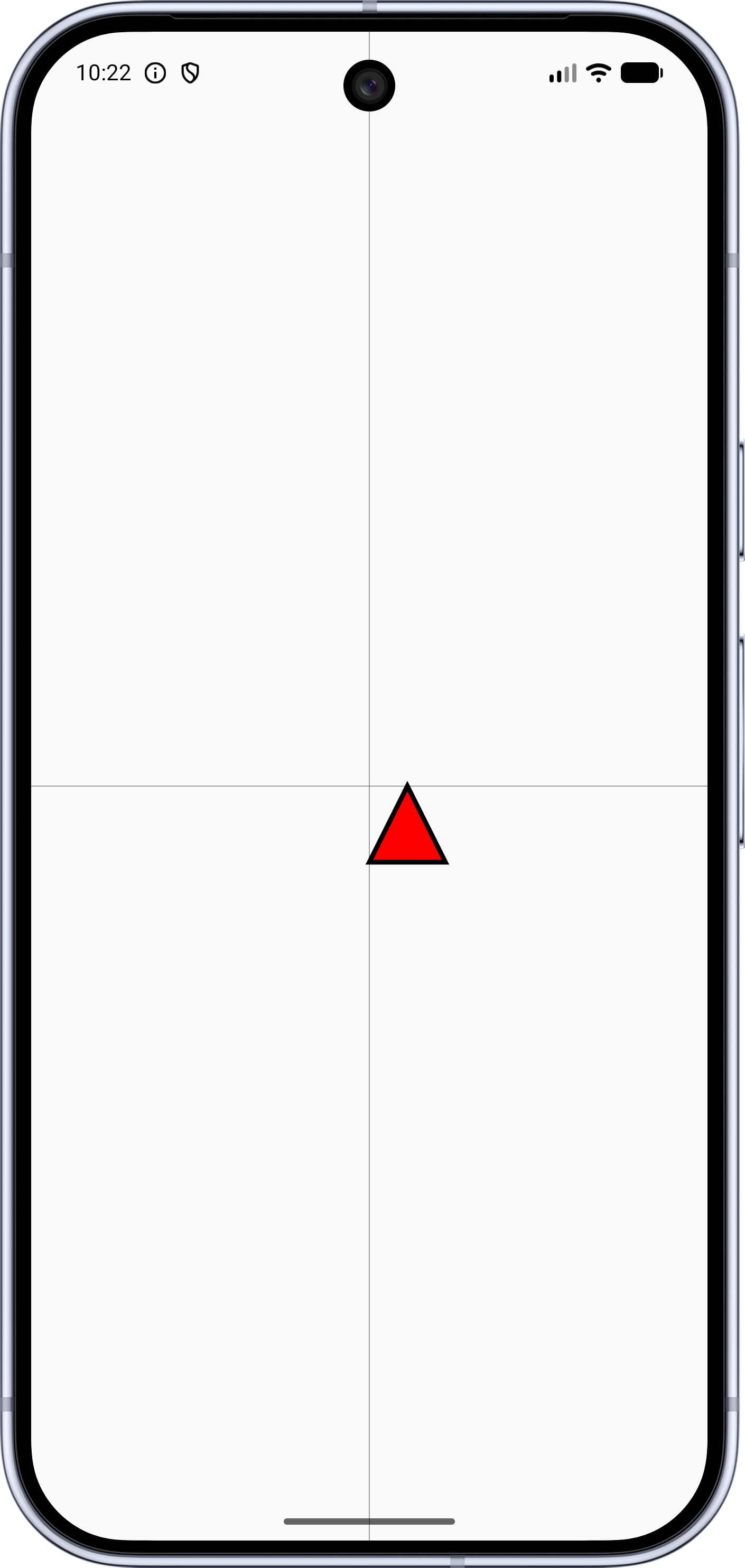
Because we're drawing at the upper-left corner of the bounding box for the triangle, it feels off-center. When the user taps their finger, we'll be dropping the shape at the finger location. This won't feel quite right; we should center the shape at the finger-tap location. To do this, we can add half the shape size to the offset.
show in full file app/src/main/java/com/androidbyexample/graph/Graph.kt
// ...

@Composable
fun Graph(
    // ...
) {
    with(LocalDensity.current) {
        // ...
        }

        val halfShapeOffset = Offset(shapeSizePx/2, shapeSizePx/2)

        Canvas(modifier = modifier) {
            val offset = center - halfShapeOffset
            drawLine(
                start = Offset(size.width/2, 0f),
                end = Offset(size.width/2, size.height),
                color = Color.DarkGray,
            )
            drawLine(
                start = Offset(0f, size.height/2),
                end = Offset(size.width, size.height/2),
                color = Color.DarkGray,
            )
            drawTriangle(offset)
        }
    }
}
// ...
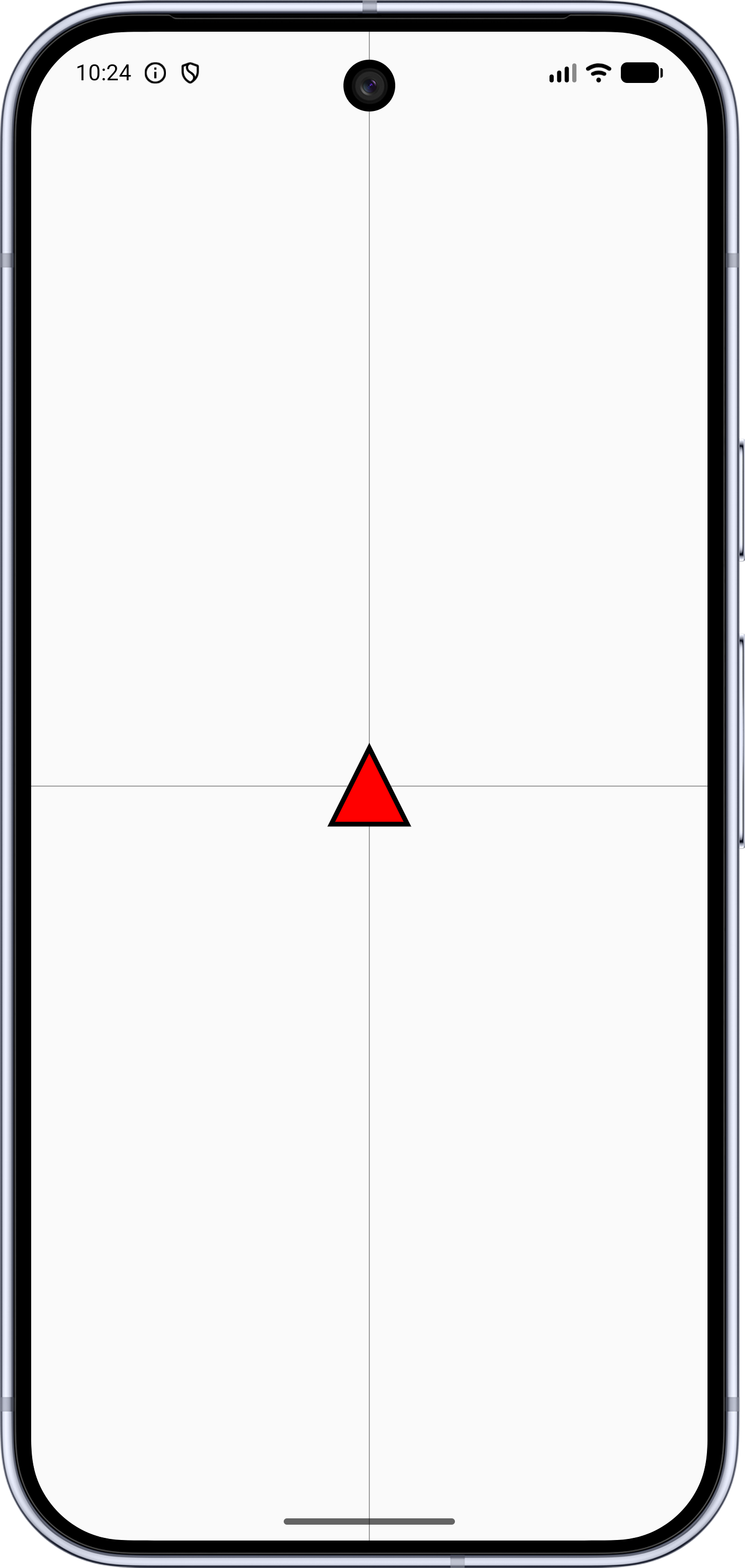
Next, we'll add the square and circle shapes.
All code changes
ADDED: app/src/main/java/com/androidbyexample/graph/Graph.kt
package com.androidbyexample.graph

import androidx.compose.foundation.Canvas
import androidx.compose.runtime.Composable
import androidx.compose.runtime.remember
import androidx.compose.ui.Modifier
import androidx.compose.ui.geometry.Offset
import androidx.compose.ui.graphics.Color
import androidx.compose.ui.graphics.Path
import androidx.compose.ui.graphics.drawscope.DrawScope
import androidx.compose.ui.graphics.drawscope.Fill
import androidx.compose.ui.graphics.drawscope.Stroke
import androidx.compose.ui.graphics.drawscope.translate
import androidx.compose.ui.platform.LocalDensity
import androidx.compose.ui.unit.Dp
import androidx.compose.ui.unit.dp

@Composable
fun Graph(
    shapeSizeDp: Dp = 48.dp,
    shapeOutlineWidthDp: Dp = 3.dp,
    shapeOutlineColor: Color = Color.Black,
    triangleColor: Color = Color.Red,
    modifier: Modifier,
) {
    with(LocalDensity.current) {
        val shapeSizePx = shapeSizeDp.toPx()
        val shapeOutlineWidthPx = shapeOutlineWidthDp.toPx()


        val trianglePath = Path().apply {
            moveTo(shapeSizePx/2, 0f)
            lineTo(shapeSizePx, shapeSizePx)
            lineTo(0f, shapeSizePx)
            close()
        }

        val shapeOutlineStroke = remember(shapeOutlineWidthPx) {
            Stroke(shapeOutlineWidthPx)
        }

        fun DrawScope.drawTriangle(
            offset: Offset,
        ) {
            translate(offset.x, offset.y) {
                drawPath(
                    path = trianglePath,
                    color = triangleColor,
                    style = Fill,
                )
                drawPath(
                    path = trianglePath,
                    color = shapeOutlineColor,
                    style = shapeOutlineStroke,
                )
            }
        }

        val halfShapeOffset = Offset(shapeSizePx/2, shapeSizePx/2)

        Canvas(modifier = modifier) {
            val offset = center - halfShapeOffset
            drawLine(
                start = Offset(size.width/2, 0f),
                end = Offset(size.width/2, size.height),
                color = Color.DarkGray,
            )
            drawLine(
                start = Offset(0f, size.height/2),
                end = Offset(size.width, size.height/2),
                color = Color.DarkGray,
            )
            drawTriangle(offset)
        }
    }
}
CHANGED: app/src/main/java/com/androidbyexample/graph/MainActivity.kt
package com.androidbyexample.graph

import android.os.Bundle
import androidx.activity.ComponentActivity
import androidx.activity.compose.setContent
import androidx.activity.enableEdgeToEdge
import androidx.compose.foundation.layout.fillMaxSize
import androidx.compose.foundation.layout.padding
import androidx.compose.material3.Scaffold
//import androidx.compose.material3.Text
//import androidx.compose.runtime.Composable
import androidx.compose.ui.Modifier
//import androidx.compose.ui.tooling.preview.Preview
import com.androidbyexample.graph.ui.theme.GraphTheme

class MainActivity : ComponentActivity() {
    override fun onCreate(savedInstanceState: Bundle?) {
        super.onCreate(savedInstanceState)
        enableEdgeToEdge()
        setContent {
            GraphTheme {
                Scaffold(modifier = Modifier.fillMaxSize()) { innerPadding ->
//                  Greeting(
//                      name = "Android",
//                      modifier = Modifier.padding(innerPadding)
                    Graph(
                        modifier =
                            Modifier
                                .padding(innerPadding)
                                .fillMaxSize()
                    )
                }
            }
        }
    }
}
//
//@Composable
//fun Greeting(name: String, modifier: Modifier = Modifier) {
//  Text(
//      text = "Hello $name!",
//      modifier = modifier
//  )
//}
//
//@Preview(showBackground = true)
//@Composable
//fun GreetingPreview() {
//  GraphTheme {
//      Greeting("Android")
//  }
//}