Graph Editor part 2
New Buttons
In this module, we'll be adding support to drag existing shapes and draw connections between them.
Let's add two more buttons on the toolbar.
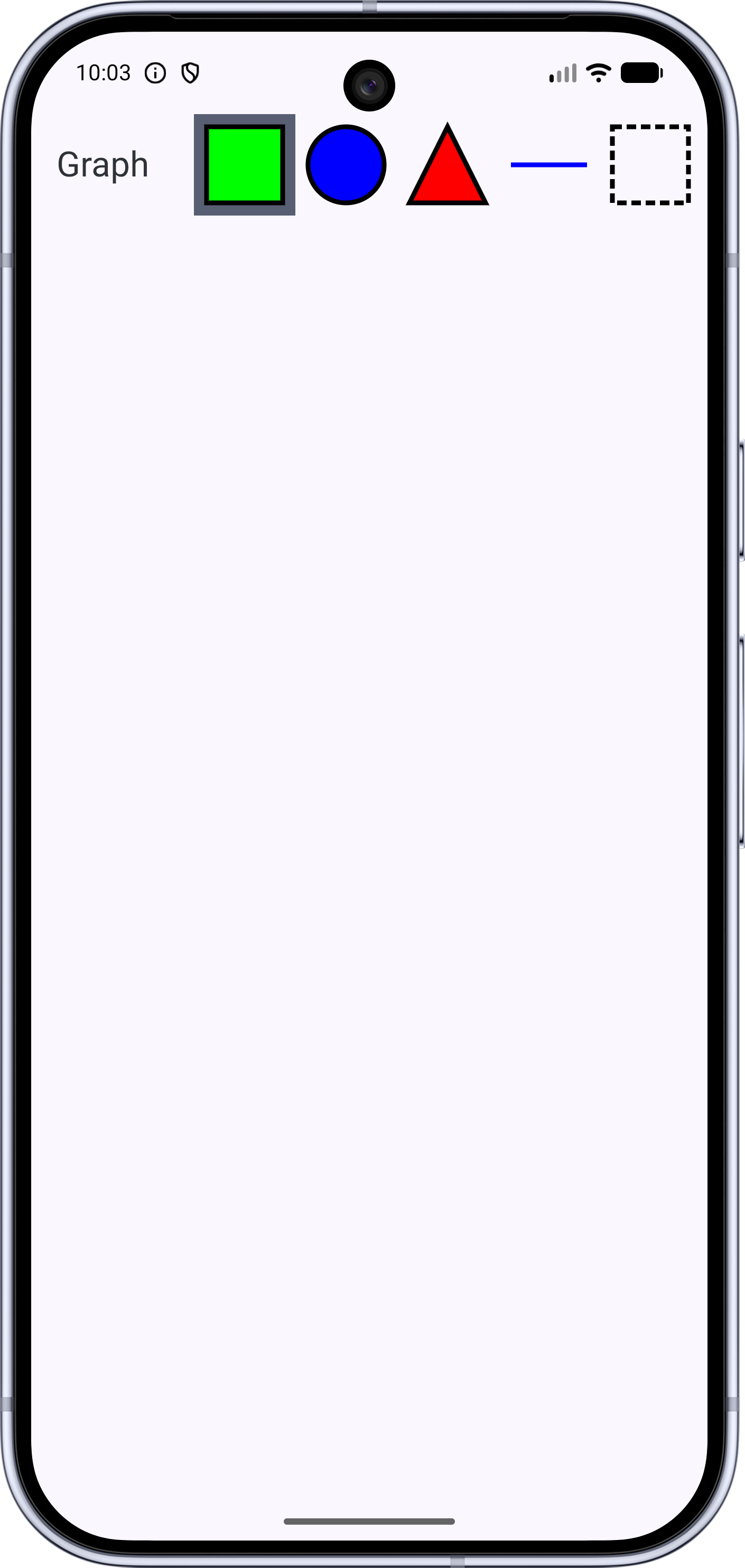
We'll be adding a new data class to track added lines, and I'd like to call that one Line to
go along with Shape. Unfortunately, during the last module, I named the "tool" for lines
Line, so let's rename it.
show in full file app/src/main/java/com/androidbyexample/graph/ToolType.kt
// ...
data object Triangle: ShapeType

//data object Line: ToolType
data object DrawLine: ToolType
data object Select: ToolType
show in full file app/src/main/java/com/androidbyexample/graph/Graph.kt
// ...

@OptIn(ExperimentalMaterial3Api::class)
@Composable
fun Graph(
    // ...
) {
    with(LocalDensity.current) {
        // ...
        Scaffold(
            // ...
        ) { innerPadding ->
            Canvas(modifier = modifier
                .padding(innerPadding)
                .fillMaxSize()
                .pointerInput(true) {
                    detectTapGestures { finger ->
                        when(val selectedTool = selectedToolRef) {
                            is ShapeType -> {
                                // ...
                                    ))
                            }
//                          Line -> TODO()
                            DrawLine -> TODO()
                            Select -> TODO()
                        }
                    }
                }
            ) {
                // ...
            }
        }
    }
}
I noticed that I missed a reference in our shape adding, so we should fix it:
show in full file app/src/main/java/com/androidbyexample/graph/Graph.kt
// ...

@OptIn(ExperimentalMaterial3Api::class)
@Composable
fun Graph(
    // ...
) {
    with(LocalDensity.current) {
        // ...
        val selectedToolRef by rememberUpdatedState(selectedTool)
        val onAddShapeRef by rememberUpdatedState(onAddShape)
        val halfShapeOffsetRef by rememberUpdatedState(halfShapeOffset)

        Scaffold(
            // ...
        ) { innerPadding ->
            Canvas(modifier = modifier
                .padding(innerPadding)
                .fillMaxSize()
                .pointerInput(true) {
                    detectTapGestures { finger ->
                        when(val selectedTool = selectedToolRef) {
                            is ShapeType -> {
                                onAddShapeRef(
                                    Shape(
                                        shapeType = selectedTool,
//                                      offset = finger - halfShapeOffset
                                        offset = finger - halfShapeOffsetRef
                                    ))
                            }
//                          Line -> TODO()
                            // ...
                        }
                    }
                }
            ) {
                // ...
            }
        }
    }
}
We'll draw a line and a dashed-outline square on the toolbar buttons to represent these new items. This line drawing will only accur for the tool button and is horizontal.
show in full file app/src/main/java/com/androidbyexample/graph/Graph.kt
// ...

@OptIn(ExperimentalMaterial3Api::class)
@Composable
fun Graph(
    // ...
) {
    with(LocalDensity.current) {
        // ...
            }
        }
        fun DrawScope.drawLine(
            offset: Offset,
        ) {
            translate(offset.x, offset.y) {
                drawLine(
                    start = Offset(0f, halfShapeSizePx),
                    end = Offset(shapeSizePx, halfShapeSizePx),
                    color = circleColor,
                    strokeWidth = shapeOutlineWidthPx,
                )
            }
        }

        val selectedToolRef by rememberUpdatedState(selectedTool)
        // ...
    }
}
The select button is represented by a square with a dashed border. We tweak our drawSquare()
function to allow the border Stroke to be passed in, defaulting to shapeOutlineStroke.
We also make filling the square optional so we'll only draw the outline.
show in full file app/src/main/java/com/androidbyexample/graph/Graph.kt
// ...

@OptIn(ExperimentalMaterial3Api::class)
@Composable
fun Graph(
    // ...
) {
    with(LocalDensity.current) {
        // ...
        fun DrawScope.drawSquare(
            offset: Offset,
            outlineStroke: Stroke = shapeOutlineStroke,
            fill: Boolean = true,
        ) {
            translate(offset.x, offset.y) {
                if (fill) {
                    drawRect(
                        topLeft = Offset.Zero,
                        size = shapeSize,
                        color = squareColor,
                        style = Fill,
                    )
                }
                drawRect(
                    topLeft = Offset.Zero,
                    size = shapeSize,
                    color = shapeOutlineColor,
//                  style = shapeOutlineStroke,
                    style = outlineStroke,
                )
            }
        }
        // ...
    }
}
Pass in two new parameters for the size of the dash and the size of the gap between dashes.
show in full file app/src/main/java/com/androidbyexample/graph/Graph.kt
// ...

@OptIn(ExperimentalMaterial3Api::class)
@Composable
fun Graph(
    // ...
    shapeSizeDp: Dp = 48.dp,
    shapeOutlineWidthDp: Dp = 3.dp,
    dashWidthDp: Dp = 6.dp,
    dashGapDp: Dp = 3.dp,
    shapeOutlineColor: Color = Color.Black,
    triangleColor: Color = Color.Red,
    // ...
) {
    with(LocalDensity.current) {
        // ...
        val shapeSize = Size(shapeSizePx, shapeSizePx)
        val halfShapeOffset = Offset(halfShapeSizePx, halfShapeSizePx)
        val dashWidthPx = dashWidthDp.toPx()
        val dashGapPx = dashGapDp.toPx()

        val trianglePath = Path().apply {
            // ...
    }
}
Remember a new Stroke for the dashed outline
show in full file app/src/main/java/com/androidbyexample/graph/Graph.kt
// ...

@OptIn(ExperimentalMaterial3Api::class)
@Composable
fun Graph(
    // ...
) {
    with(LocalDensity.current) {
        // ...
            Stroke(shapeOutlineWidthPx)
        }
        val dashedOutlineStroke =
            remember(shapeOutlineWidthPx, dashWidthPx, dashGapPx) {
                Stroke(
                    width = shapeOutlineWidthPx,
                    pathEffect = PathEffect.dashPathEffect(
                        intervals = floatArrayOf(dashWidthPx, dashGapPx),
                        phase = 0f,
                    )
                )
            }

        fun DrawScope.drawTriangle(
            // ...
    }
}
This is similar to our previous Stroke, but we add a pathEffect taking an array of dash widths
and gaps to create the dash pattern. We're using uniform dashes and gaps, so we just pass in the
two of them. The phase tells the path effect at which index to start in the intervals array.
Now we can add the new buttons
show in full file app/src/main/java/com/androidbyexample/graph/Graph.kt
// ...

@OptIn(ExperimentalMaterial3Api::class)
@Composable
fun Graph(
    // ...
) {
    with(LocalDensity.current) {
        // ...
        Scaffold(
            topBar = {
                TopAppBar(
                    // ...
                    actions = {
                        // ...
                            onSelectTool = onSelectedToolChanged,
                        )
                        ToolButton(
                            draw = { drawLine(it) },
                            shapeSizeDp = shapeSizeDp,
                            tool = DrawLine,
                            selectedTool = selectedTool,
                            selectionColor = selectedToolColor,
                            onSelectTool = onSelectedToolChanged,
                        )
                        ToolButton(
                            draw = {
                                drawSquare(
                                    offset = it,
                                    outlineStroke = dashedOutlineStroke,
                                    fill = false,
                                )
                            },
                            shapeSizeDp = shapeSizeDp,
                            tool = Select,
                            selectedTool = selectedTool,
                            selectionColor = selectedToolColor,
                            onSelectTool = onSelectedToolChanged,
                        )
                    }
                )
            },
            // ...
        ) { innerPadding ->
            // ...
        }
    }
}
All code changes
CHANGED: app/src/main/java/com/androidbyexample/graph/Graph.kt
package com.androidbyexample.graph
import androidx.compose.foundation.Canvas
import androidx.compose.foundation.gestures.detectTapGestures
import androidx.compose.foundation.layout.fillMaxSize
import androidx.compose.foundation.layout.padding
import androidx.compose.material3.ExperimentalMaterial3Api
import androidx.compose.material3.MaterialTheme
import androidx.compose.material3.Scaffold
import androidx.compose.material3.Text
import androidx.compose.material3.TopAppBar
import androidx.compose.runtime.Composable
import androidx.compose.runtime.getValue
import androidx.compose.runtime.remember
import androidx.compose.runtime.rememberUpdatedState
import androidx.compose.ui.Modifier
import androidx.compose.ui.geometry.Offset
import androidx.compose.ui.geometry.Size
import androidx.compose.ui.graphics.Color
import androidx.compose.ui.graphics.Path
import androidx.compose.ui.graphics.PathEffect
import androidx.compose.ui.graphics.drawscope.DrawScope
import androidx.compose.ui.graphics.drawscope.Fill
import androidx.compose.ui.graphics.drawscope.Stroke
import androidx.compose.ui.graphics.drawscope.translate
import androidx.compose.ui.input.pointer.pointerInput
import androidx.compose.ui.platform.LocalDensity
import androidx.compose.ui.res.stringResource
import androidx.compose.ui.unit.Dp
import androidx.compose.ui.unit.dp
@OptIn(ExperimentalMaterial3Api::class)
@Composable
fun Graph(
shapes: List<Shape>,
onAddShape: (Shape) -> Unit,
selectedTool: ToolType,
onSelectedToolChanged: (ToolType) -> Unit,
modifier: Modifier = Modifier,
shapeSizeDp: Dp = 48.dp,
shapeOutlineWidthDp: Dp = 3.dp,
dashWidthDp: Dp = 6.dp,
dashGapDp: Dp = 3.dp,
shapeOutlineColor: Color = Color.Black,
triangleColor: Color = Color.Red,
circleColor: Color = Color.Blue,
squareColor: Color = Color.Green,
selectedToolColor: Color = MaterialTheme.colorScheme.secondary,
) {
with(LocalDensity.current) {
val shapeSizePx = shapeSizeDp.toPx()
val halfShapeSizePx = shapeSizePx/2
val shapeOutlineWidthPx = shapeOutlineWidthDp.toPx()
val shapeSize = Size(shapeSizePx, shapeSizePx)
val halfShapeOffset = Offset(halfShapeSizePx, halfShapeSizePx)
val dashWidthPx = dashWidthDp.toPx()
val dashGapPx = dashGapDp.toPx()
val trianglePath = Path().apply {
moveTo(shapeSizePx/2, 0f)
lineTo(shapeSizePx, shapeSizePx)
lineTo(0f, shapeSizePx)
close()
}
val shapeOutlineStroke = remember(shapeOutlineWidthPx) {
Stroke(shapeOutlineWidthPx)
}
val dashedOutlineStroke =
remember(shapeOutlineWidthPx, dashWidthPx, dashGapPx) {
Stroke(
width = shapeOutlineWidthPx,
pathEffect = PathEffect.dashPathEffect(
intervals = floatArrayOf(dashWidthPx, dashGapPx),
phase = 0f,
)
)
}
fun DrawScope.drawTriangle(
offset: Offset,
) {
translate(offset.x, offset.y) {
drawPath(
path = trianglePath,
color = triangleColor,
style = Fill,
)
drawPath(
path = trianglePath,
color = shapeOutlineColor,
style = shapeOutlineStroke,
)
}
}
fun DrawScope.drawSquare(
offset: Offset,
outlineStroke: Stroke = shapeOutlineStroke,
fill: Boolean = true,
) {
translate(offset.x, offset.y) {
if (fill) {
drawRect(
topLeft = Offset.Zero,
size = shapeSize,
color = squareColor,
style = Fill,
)
}
drawRect(
topLeft = Offset.Zero,
size = shapeSize,
color = shapeOutlineColor,
// style = shapeOutlineStroke,
style = outlineStroke,
)
}
}
fun DrawScope.drawCircle(
offset: Offset,
) {
translate(offset.x, offset.y) {
drawCircle(
center = halfShapeOffset,
radius = halfShapeSizePx,
color = circleColor,
style = Fill,
)
drawCircle(
center = halfShapeOffset,
radius = halfShapeSizePx,
color = shapeOutlineColor,
style = shapeOutlineStroke,
)
}
}
fun DrawScope.drawLine(
offset: Offset,
) {
translate(offset.x, offset.y) {
drawLine(
start = Offset(0f, halfShapeSizePx),
end = Offset(shapeSizePx, halfShapeSizePx),
color = circleColor,
strokeWidth = shapeOutlineWidthPx,
)
}
}
val selectedToolRef by rememberUpdatedState(selectedTool)
val onAddShapeRef by rememberUpdatedState(onAddShape)
val halfShapeOffsetRef by rememberUpdatedState(halfShapeOffset)
Scaffold(
topBar = {
TopAppBar(
title = { Text(stringResource(R.string.graph)) },
actions = {
ToolButton(
draw = { drawSquare(it) },
shapeSizeDp = shapeSizeDp,
tool = Square,
selectedTool = selectedTool,
selectionColor = selectedToolColor,
onSelectTool = onSelectedToolChanged,
)
ToolButton(
draw = { drawCircle(it) },
shapeSizeDp = shapeSizeDp,
tool = Circle,
selectedTool = selectedTool,
selectionColor = selectedToolColor,
onSelectTool = onSelectedToolChanged,
)
ToolButton(
draw = { drawTriangle(it) },
shapeSizeDp = shapeSizeDp,
tool = Triangle,
selectedTool = selectedTool,
selectionColor = selectedToolColor,
onSelectTool = onSelectedToolChanged,
)
}
)
},
modifier = modifier,
) { innerPadding ->
Canvas(modifier = modifier
.padding(innerPadding)
.fillMaxSize()
.pointerInput(true) {
detectTapGestures { finger ->
when(val selectedTool = selectedToolRef) {
is ShapeType -> {
onAddShapeRef(
Shape(
shapeType = selectedTool,
// offset = finger - halfShapeOffset
offset = finger - halfShapeOffsetRef
))
}
// Line -> TODO()
DrawLine -> TODO()
Select -> TODO()
}
}
}
) {
shapes.forEach { shape ->
when(shape.shapeType) {
Square -> drawSquare(shape.offset)
Circle -> drawCircle(shape.offset)
Triangle -> drawTriangle(shape.offset)
}
}
}
}
}
}
CHANGED: app/src/main/java/com/androidbyexample/graph/ToolType.kt
package com.androidbyexample.graph

sealed interface ToolType
sealed interface ShapeType: ToolType

data object Square: ShapeType
data object Circle: ShapeType
data object Triangle: ShapeType

//data object Line: ToolType
data object DrawLine: ToolType
data object Select: ToolType