Graph Editor part 1
The Toolbar
Now we'll add a toolbar at the top to allow the user to select which shapes to drop on the
Canvas.
To represent the various tools, we'll use a sealed interface:
show in full file app/src/main/java/com/androidbyexample/graph/ToolType.kt
package com.androidbyexample.graph

sealed interface ToolType
sealed interface ShapeType: ToolType

data object Square: ShapeType
data object Circle: ShapeType
data object Triangle: ShapeType

data object Line: ToolType
data object Select: ToolType
ToolType is a top-level type representing the tools on the toolbar. ShapeType is a subtype
of it to just represent the shapes. This will come in handy later.
We define a Shape class to represent shapes that the user has dropped on the Canvas:
show in full file app/src/main/java/com/androidbyexample/graph/Shape.kt
// ...
import androidx.compose.ui.geometry.Offset

data class Shape(
    val shapeType: ShapeType,
    val offset: Offset,
)
And a view model to track those shapes:
show in full file app/src/main/java/com/androidbyexample/graph/GraphViewModel.kt
// ...
import kotlinx.coroutines.flow.MutableStateFlow

class GraphViewModel: ViewModel() {
    val shapes: Flow<List<Shape>>
        field = MutableStateFlow<List<Shape>>(emptyList())
    val selectedTool: Flow<ToolType>
        field = MutableStateFlow<ToolType>(Square)

    fun addShape(shape: Shape) {
        shapes.value += shape
    }
    fun selectTool(tool: ToolType) {
        selectedTool.value = tool
    }
}
Here we track the list of shapes to display and selected tool, exposing them as Flows.
Note
We're using a feature of newer versions of Kotlin here called "explicit backing fields".
This allows you to separately specify the public and private types of a property.
You do this by specifying field = on a val property.
This only changes the visible property type and doesn't stop the user from casting
the property to its underlying type! If you really want to lock down the type and
prevent casting, define a backing property such as
private val _shapes = MutableStateFlow<List<Shape>>(emptyList())
val shapes: Flow<List<Shape>> = _shapes.asStateFlow()
where asStateFlow creates a read-only decorator that wraps the underlying MutableStateFlow
so the caller cannot access it.
In many cases, using the explicit backing field will be fine. However, if you're defining an API for others to use, you should consider the backing property approach to ensure the API is used as intended and the caller cannot cast-around the exposed non-mutable type.
Use the view model in the MainActivity (or you could define a Ui function that takes
the view model and collects its Flows)
show in full file app/src/main/java/com/androidbyexample/graph/MainActivity.kt
// ...

class MainActivity : ComponentActivity() {
    private val viewModel by viewModels<GraphViewModel>()

    override fun onCreate(savedInstanceState: Bundle?) {
        super.onCreate(savedInstanceState)
        enableEdgeToEdge()
        setContent {
            val shapes by viewModel.shapes.collectAsStateWithLifecycle(emptyList())
            val selectedTool by viewModel.selectedTool.collectAsStateWithLifecycle(Square)

            GraphTheme {
//              Scaffold(modifier = Modifier.fillMaxSize()) { innerPadding ->
                Graph(
//                      modifier =
//                          Modifier
//                              .padding(innerPadding)
//                              .fillMaxSize()
                    shapes = shapes,
                    selectedTool = selectedTool,
                    onSelectedToolChanged = viewModel::selectTool,
                )
            }
        }
    }
//  }
}
We define some new parameters to our Graph function
show in full file app/src/main/java/com/androidbyexample/graph/Graph.kt
// ...

@OptIn(ExperimentalMaterial3Api::class)
@Composable
fun Graph(
    shapes: List<Shape>,
    selectedTool: ToolType,
    onSelectedToolChanged: (ToolType) -> Unit,
    modifier: Modifier = Modifier,
    shapeSizeDp: Dp = 48.dp,
    // ...
) {
    // ...
}
// ...
Now we can define what the Toolbar looks like.
To start, we define a toolbar button:
show in full file app/src/main/java/com/androidbyexample/graph/ToolButton.kt
// ...
import androidx.compose.ui.unit.dp

@Composable
fun ToolButton(
    tool: ToolType, // the tool this button represents
    selectedTool: ToolType, // which tool is selected, so we can highlight
    selectionColor: Color,
    draw: DrawScope.(Offset) -> Unit,
    onSelectTool: (ToolType) -> Unit,
    shapeSizeDp: Dp,
    modifier: Modifier = Modifier,
) {
    val backgroundColor =
        if (selectedTool == tool) {
            selectionColor
        } else {
            Color.Transparent
        }

    Canvas(
        modifier = modifier
            .background(backgroundColor)
            .padding(8.dp)
            .size(shapeSizeDp)
            .clickable { onSelectTool(tool) }
    ) {
        draw(Offset.Zero)
    }
}
We pass in a draw function, which is an extension on DrawScope. This allows us to pass in our
shape-drawing functions to draw the same shapes on the buttons.
We'll use these buttons in a Scaffold as before, moving the Scaffold into the Canvas.
show in full file app/src/main/java/com/androidbyexample/graph/Graph.kt
// ...

@OptIn(ExperimentalMaterial3Api::class)
@Composable
fun Graph(
    // ...
) {
    with(LocalDensity.current) {
        // ...
        }

//      Canvas(modifier = modifier) {
        Scaffold(
            topBar = {
                TopAppBar(
                    title = { Text(stringResource(R.string.graph)) },
                    actions = {
                        ToolButton(
                            draw = { drawSquare(it) },
                            shapeSizeDp = shapeSizeDp,
                            tool = Square,
                            selectedTool = selectedTool,
                            selectionColor = selectedToolColor,
                            onSelectTool = onSelectedToolChanged,
                        )
                        ToolButton(
                            draw = { drawCircle(it) },
                            shapeSizeDp = shapeSizeDp,
                            tool = Circle,
                            selectedTool = selectedTool,
                            selectionColor = selectedToolColor,
                            onSelectTool = onSelectedToolChanged,
                        )
                        ToolButton(
                            draw = { drawTriangle(it) },
                            shapeSizeDp = shapeSizeDp,
                            tool = Triangle,
                            selectedTool = selectedTool,
                            selectionColor = selectedToolColor,
                            onSelectTool = onSelectedToolChanged,
                        )
                    }
                )
            },
            modifier = modifier,
        ) { innerPadding ->
            Canvas(modifier = modifier
                .padding(innerPadding)
                .fillMaxSize()) {
                drawTriangle(Offset(100f, 100f))
                drawCircle(Offset(150f, 150f))
                drawSquare(Offset(200f, 200f))
            }
        }
    }
}
// ...
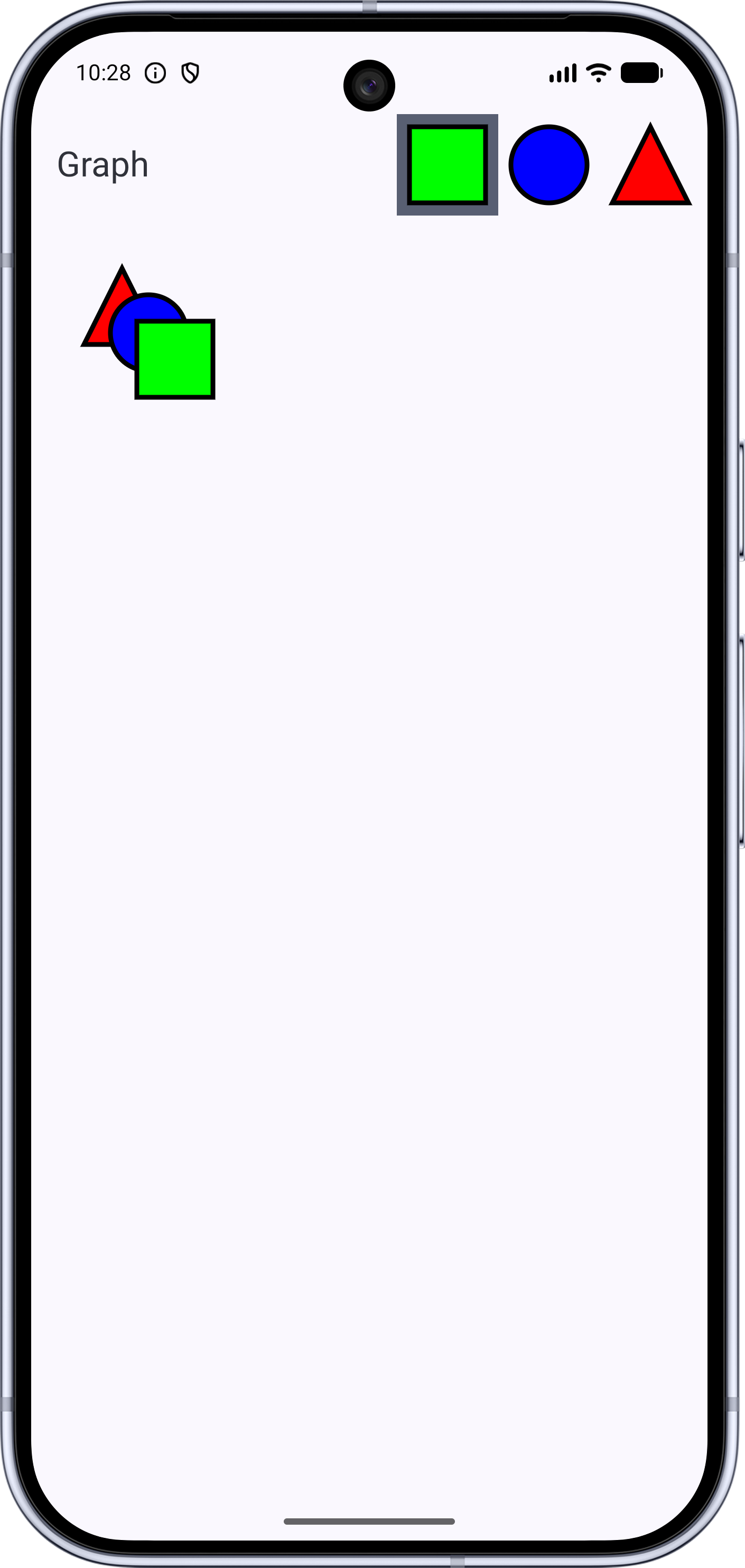
When we run, we'll now see the toolbar with the three shapes. Clicking on shapes changes which is selected
All code changes
CHANGED: app/src/main/java/com/androidbyexample/graph/Graph.kt
package com.androidbyexample.graph

import androidx.compose.foundation.Canvas
import androidx.compose.foundation.layout.fillMaxSize
import androidx.compose.foundation.layout.padding
import androidx.compose.material3.ExperimentalMaterial3Api
import androidx.compose.material3.MaterialTheme
import androidx.compose.material3.Scaffold
import androidx.compose.material3.Text
import androidx.compose.material3.TopAppBar
import androidx.compose.runtime.Composable
import androidx.compose.runtime.remember
import androidx.compose.ui.Modifier
import androidx.compose.ui.geometry.Offset
import androidx.compose.ui.geometry.Size
import androidx.compose.ui.graphics.Color
import androidx.compose.ui.graphics.Path
import androidx.compose.ui.graphics.drawscope.DrawScope
import androidx.compose.ui.graphics.drawscope.Fill
import androidx.compose.ui.graphics.drawscope.Stroke
import androidx.compose.ui.graphics.drawscope.translate
import androidx.compose.ui.platform.LocalDensity
import androidx.compose.ui.res.stringResource
import androidx.compose.ui.unit.Dp
import androidx.compose.ui.unit.dp

@OptIn(ExperimentalMaterial3Api::class)
@Composable
fun Graph(
    shapes: List<Shape>,
    selectedTool: ToolType,
    onSelectedToolChanged: (ToolType) -> Unit,
    modifier: Modifier = Modifier,
    shapeSizeDp: Dp = 48.dp,
    shapeOutlineWidthDp: Dp = 3.dp,
    shapeOutlineColor: Color = Color.Black,
    triangleColor: Color = Color.Red,
    circleColor: Color = Color.Blue,
    squareColor: Color = Color.Green,
//  modifier: Modifier,
    selectedToolColor: Color = MaterialTheme.colorScheme.secondary,
) {
    with(LocalDensity.current) {
        val shapeSizePx = shapeSizeDp.toPx()
        val halfShapeSizePx = shapeSizePx/2
        val shapeOutlineWidthPx = shapeOutlineWidthDp.toPx()
        val shapeSize = Size(shapeSizePx, shapeSizePx)
        val halfShapeOffset = Offset(halfShapeSizePx, halfShapeSizePx)

        val trianglePath = Path().apply {
            moveTo(shapeSizePx/2, 0f)
            lineTo(shapeSizePx, shapeSizePx)
            lineTo(0f, shapeSizePx)
            close()
        }

        val shapeOutlineStroke = remember(shapeOutlineWidthPx) {
            Stroke(shapeOutlineWidthPx)
        }

        fun DrawScope.drawTriangle(
            offset: Offset,
        ) {
            translate(offset.x, offset.y) {
                drawPath(
                    path = trianglePath,
                    color = triangleColor,
                    style = Fill,
                )
                drawPath(
                    path = trianglePath,
                    color = shapeOutlineColor,
                    style = shapeOutlineStroke,
                )
            }
        }
        fun DrawScope.drawSquare(
            offset: Offset,
        ) {
            translate(offset.x, offset.y) {
                drawRect(
                    topLeft = Offset.Zero,
                    size = shapeSize,
                    color = squareColor,
                    style = Fill,
                )
                drawRect(
                    topLeft = Offset.Zero,
                    size = shapeSize,
                    color = shapeOutlineColor,
                    style = shapeOutlineStroke,
                )
            }
        }
        fun DrawScope.drawCircle(
            offset: Offset,
        ) {
            translate(offset.x, offset.y) {
                drawCircle(
                    center = halfShapeOffset,
                    radius = halfShapeSizePx,
                    color = circleColor,
                    style = Fill,
                )
                drawCircle(
                    center = halfShapeOffset,
                    radius = halfShapeSizePx,
                    color = shapeOutlineColor,
                    style = shapeOutlineStroke,
                )
            }
        }

//      Canvas(modifier = modifier) {
        Scaffold(
            topBar = {
                TopAppBar(
                    title = { Text(stringResource(R.string.graph)) },
                    actions = {
                        ToolButton(
                            draw = { drawSquare(it) },
                            shapeSizeDp = shapeSizeDp,
                            tool = Square,
                            selectedTool = selectedTool,
                            selectionColor = selectedToolColor,
                            onSelectTool = onSelectedToolChanged,
                        )
                        ToolButton(
                            draw = { drawCircle(it) },
                            shapeSizeDp = shapeSizeDp,
                            tool = Circle,
                            selectedTool = selectedTool,
                            selectionColor = selectedToolColor,
                            onSelectTool = onSelectedToolChanged,
                        )
                        ToolButton(
                            draw = { drawTriangle(it) },
                            shapeSizeDp = shapeSizeDp,
                            tool = Triangle,
                            selectedTool = selectedTool,
                            selectionColor = selectedToolColor,
                            onSelectTool = onSelectedToolChanged,
                        )
                    }
                )
            },
            modifier = modifier,
        ) { innerPadding ->
            Canvas(modifier = modifier
                .padding(innerPadding)
                .fillMaxSize()) {
                drawTriangle(Offset(100f, 100f))
                drawCircle(Offset(150f, 150f))
                drawSquare(Offset(200f, 200f))
            }
        }
    }
}
//
ADDED: app/src/main/java/com/androidbyexample/graph/GraphViewModel.kt
package com.androidbyexample.graph

import androidx.lifecycle.ViewModel
import kotlinx.coroutines.flow.Flow
import kotlinx.coroutines.flow.MutableStateFlow

class GraphViewModel: ViewModel() {
    val shapes: Flow<List<Shape>>
        field = MutableStateFlow<List<Shape>>(emptyList())
    val selectedTool: Flow<ToolType>
        field = MutableStateFlow<ToolType>(Square)

    fun addShape(shape: Shape) {
        shapes.value += shape
    }
    fun selectTool(tool: ToolType) {
        selectedTool.value = tool
    }
}
CHANGED: app/src/main/java/com/androidbyexample/graph/MainActivity.kt
package com.androidbyexample.graph

import android.os.Bundle
import androidx.activity.ComponentActivity
import androidx.activity.compose.setContent
import androidx.activity.enableEdgeToEdge
//import androidx.compose.foundation.layout.fillMaxSize
//import androidx.compose.foundation.layout.padding
//import androidx.compose.material3.Scaffold
//import androidx.compose.ui.Modifier
import androidx.activity.viewModels
import androidx.compose.runtime.getValue
import androidx.lifecycle.compose.collectAsStateWithLifecycle
import com.androidbyexample.graph.ui.theme.GraphTheme

class MainActivity : ComponentActivity() {
    private val viewModel by viewModels<GraphViewModel>()

    override fun onCreate(savedInstanceState: Bundle?) {
        super.onCreate(savedInstanceState)
        enableEdgeToEdge()
        setContent {
            val shapes by viewModel.shapes.collectAsStateWithLifecycle(emptyList())
            val selectedTool by viewModel.selectedTool.collectAsStateWithLifecycle(Square)

            GraphTheme {
//              Scaffold(modifier = Modifier.fillMaxSize()) { innerPadding ->
                Graph(
//                      modifier =
//                          Modifier
//                              .padding(innerPadding)
//                              .fillMaxSize()
                    shapes = shapes,
                    selectedTool = selectedTool,
                    onSelectedToolChanged = viewModel::selectTool,
                )
            }
        }
    }
//  }
}
ADDED: app/src/main/java/com/androidbyexample/graph/Shape.kt
package com.androidbyexample.graph

import androidx.compose.ui.geometry.Offset

data class Shape(
    val shapeType: ShapeType,
    val offset: Offset,
)
ADDED: app/src/main/java/com/androidbyexample/graph/ToolButton.kt
package com.androidbyexample.graph
import androidx.compose.foundation.Canvas
import androidx.compose.foundation.background
import androidx.compose.foundation.clickable
import androidx.compose.foundation.layout.padding
import androidx.compose.foundation.layout.size
import androidx.compose.runtime.Composable
import androidx.compose.ui.Modifier
import androidx.compose.ui.geometry.Offset
import androidx.compose.ui.graphics.Color
import androidx.compose.ui.graphics.drawscope.DrawScope
import androidx.compose.ui.unit.Dp
import androidx.compose.ui.unit.dp
ADDED: app/src/main/java/com/androidbyexample/graph/ToolType.kt
package com.androidbyexample.graph

sealed interface ToolType
sealed interface ShapeType: ToolType

data object Square: ShapeType
data object Circle: ShapeType
data object Triangle: ShapeType

data object Line: ToolType
data object Select: ToolType
CHANGED: app/src/main/res/values/strings.xml
<resources>
    <string name="app_name">Graph</string>
    <string name="graph">Graph</string>
</resources>